

Sela Theme – Blog not in navigation
-
I recently switched to the Sela theme and I wanted to put my blog in the top navigation links, not as the homepage. I switched to static front page to create a new homepage but now I can’t find how to put the blog in the navigation links. It’s not on my site at all. I would like to have it back but I don’t want the sidebar with archives, etc showing on the entire site, just the blog page. Is that possible? Any advice appreciated: kastleproductions.wordpress.com
The blog I need help with is: (visible only to logged in users)
-
Hi there!
The first step to creating a posts page is to publish a blank new page entitled “Blog.”
From there, navigate to the Static Front Page panel of the WordPress.com Customizer. Select your newly published “Blog” page from the posts page dropdown and save your changes.
Let me know how you get on with that or if you have any extra questions.
-
Hi @Siobhyb
Thanks for responding! I do not want the blog to show as my front page. I want it to show as a link in the top navigation. Right now it is not showing at all since I changed to the Sela theme and set the “Static Page” in the customizer. Is that the only way to make it show on the site again? I can still see my old blog posts in the editing dashboard, they just aren’t showing anywhere on the site. Any advice is greatly appreciated! -
To add a link to your blog, you first need to assign your posts to a page, and then add it to a custom menu.
1 – Create a dummy page and call it Blog
2 – In your Customizer‘s Static Front Page panel, Select the Blog page you just created from “Posts page” dropdown menu: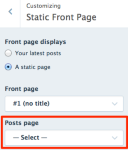
3 – Create a custom menu following the guide. Add a link to the Blog page as part of your custom menu.
If you get stuck at any step, just let us know.
-
Thank you @kathrynwp for the response. Instead of creating a custom menu, I created a blog page then a page for the actual blog post that has the blog page as the parent page. This created a pulldown menu under the blog page for each post and I guess I’ll just put a summary of what the blogs are about on the actual blog page.
See the test post on the site: kastleproductions.wordpress.com.
It looks like that’s the same as what the custom menu does, yes?
I just worry if I create a lot of blogs, that pulldown menu might get very long!
Any other suggestions welcome!
Thank you!! -
Hi there, it’s coming along!
There are a couple of steps that were missed. To create a separate page with your blog on it, you still need to to to your Customizer’s Static Front page panel and select your new Blog dummy page as your posts page. This is what it should look like:
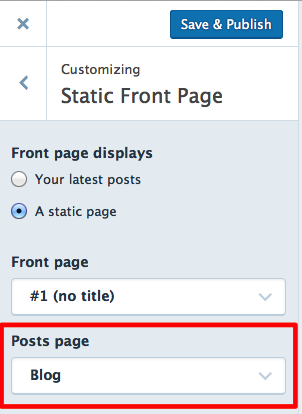
Once you do that, your Blog page will be displayed here, and it will display all your blog posts, one after the other, instead of just saying Coming Soon:
https://kastleproductions.wordpress.com/blog/
I just worry if I create a lot of blogs, that pulldown menu might get very long!
Don’t worry — your individual blog posts won’t be displayed in your menu.
You can go ahead and delete this page, it’s not needed:
https://kastleproductions.wordpress.com/blog/blog-1-test/
Once you fix up your Customizer’s Front Page settings and remove the test page you created above, things should start to look better. :)
-
Hello – I have a blog with Sela installed – rightroyalmother.com – and the front page, which has been showing my posts, now just shows the title of the latest post and the rest of the page is just faint, diagonal lines. Help please!!
-
rightroyalmother – I don’t see any WordPress.com-hosted sites on this account, nor do I see Sela at the URL you provided. If you’re running the WordPress software on your own hosting and need help with Sela, please post in its forum at WordPress.org:
https://wordpress.org/support/theme/sela
You’ll need a free WordPress.org account to post – if you don’t already have one, you can register here:
https://wordpress.org/support/register.php
Be sure to remove any maintenance-mode setting if you still need help.
-
-
You’re very welcome – glad to hear things are set up as you’d like! Feel free to start a new thread if you need help with anything else.


- The topic ‘Sela Theme – Blog not in navigation’ is closed to new replies.
 WordPress.com Forums