

Sela Theme Feature Image Problem
-
I currently have two sites that run on the Sela theme. One is fine but the other is having problems with the feature image. For some reason it is showing the entire image now. Before it used to show a portion of the image to fit the dimensions of the feature image. Any ideas on what happened and how to fix this? If not I’ll resize the images I guess.
ThanksThe blog I need help with is: (visible only to logged in users)
-
Could you please provide a link to a couple of example posts or pages where the featured images are not the size you’d like and I’ll be glad to take a look.
-
Hi – I’m having the same image with the Ceruano theme so I’m not sure whether it is the same problem?
Thanks!
https://travelandtrouvailles.wordpress.com/2016/11/04/a-day-in-girona-part-2/ -
travelandtrouvailles – could you please start a new thread? It’ll be easier to help you one-on -one. Thanks.
-
Sela crops featured images on pages using the full-width and grid page templates to a height of 435px. If the original height is shorter than 435px, the image won’t be cropped.
I can confirm this is what I see when I use a browser inspector on your pages, for example:
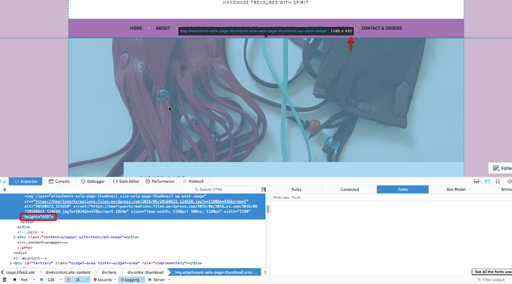
Could you show me your other site where you see something different? Thanks!
-
The problem is it’s not cropping the images even though it says it does. I took a screenshot of teh same page as you did and as you can see it took me three shots to fit it all in
https://photos.google.com/photo/AF1QipOzUb4NldhCRL0CnEyXu1VTd1pauslJUfsSBQx9
https://photos.google.com/photo/AF1QipPSZg-UijnBXewUiSFY2qOXMFygCI7obesGnqim
https://photos.google.com/photo/AF1QipNyR0wUMaecZSyuIuU2UOVYGrEbNHSalINlFgwn
-
I’m getting a “not found” error on those images. Could you put them in your Media Library so I can take a look?
-
Could you also provide a link to your other site running Sela — the one you said is fine — so I can compare?
-
Sorry. Try these for the screenshots
https://bearlyworkcreations.files.wordpress.com/2016/11/screenshot-10.png
https://bearlyworkcreations.files.wordpress.com/2016/11/screenshot-9.png
https://bearlyworkcreations.files.wordpress.com/2016/11/screenshot-8.pngHere’s a page from the other site
https://delrobacreations.com/people-products/accessories/wellness-relaxation/delpack-heat-cold-therapy-packs/Thanks again
-
Thanks for the screenshots, helpful!
I visited https://bearlyworkcreations.wordpress.com/leather-bags/ in Firefox 50.0 and the image looks correct there: https://cloudup.com/cMsjBpHHiu0
I can also see the correct height of 435px referenced in the browser inspector in your screenshot, so I’m not sure why it’s being displayed too tall on your end.
Could you please try a different browser like Chrome and let me know if you see the same issue here? That could rule out some things.
Could you try:
– clearing your browser cache
– restarting Firefox in safe mode to see if an extension might be interferingCould you also let me know:
– what version of Firefox are you running
– your computer’s OS and version number
– device typeThanks!
-
Hi.
I’m using Firefox 50.0 as well. I”m running the latest version of Windows 10 on a Lenovo laptop.
I’ve checked it on a number of devices and OS with the following results;
Android, latest version of Galaxy S7 – Shows fine
Safari, latest on IPad – Shows wrong
Google App, latets on IPad – SHows wrong
Chrome, latest on Windows 10 laptop – Shows fine -
I have been trying to load a featured image for a while and while it shows that is loaded when I preview the site I can’t see an image?
-
@emilyroseflorist – could you open up a new thread? That will help to keep the different questions organized :)
-
@delrobabrowncoats – I’ve just tested your site and I see the same large images you do, in both Chrome and Firefox.
In testing, we found that it appears to be something in the image files themselves that’s disrupting the crop. If we download the image you’ve originally uploaded, resave in photoshop it with a new file name and upload that new copy, the crop works (the leather bags page looks much better now after testing this).
are you using a specific camera or app to take these photos? If use a different app or camera, do the uploaded images behave the same way? I’m curious what kind of data might be getting added to the file and where it may be coming from.


- The topic ‘Sela Theme Feature Image Problem’ is closed to new replies.
 WordPress.com Forums


