

Sela Theme: Front Page layout similar to theme demo
-
Hello!
I know this may be a ridiculously redundant, beginner question (I am familiar with HTML, CSS and VERY basic coding but am trying to teach myself the ins-and-outs of WordPress on my own) but I recently installed the Sela theme to my site and am trying to figure out how to create a similar front page to what is shown in the Sela Theme demo. I created a static front page, however I do not know how to display the links and images below as they show them, nor the testimonials on my front page. The page I’m working on is just a test to see if I can figure this out. Any help?
https://williamjamesd.wordpress.com/)
The blog I need help with is: (visible only to logged in users)
-
Hi there, the Sela setup guide explains how to set up all its features:
https://wordpress.com/themes/sela/
Have look at that and if you are still stuck on anything, let me know.
-
Thank you, that does help a little bit. However, I have another question.
When you create a blog page along with your static front page, what is the purpose of creating a blank page titled ‘Blog’? I’m sorry again that this is so beginner but I am confused. How do you post blog posts to a blog page?
-
Glad that helps!
Have a look at the guide to setting up a static front page with a separate blog page:
You need to set up a placeholder page for the blog so you can assign it as the page on which the blog posts will be displayed, otherwise WordPress doesn’t know where they should go. It’s a bit of a historical quirk of WordPress that this step needs to be done, I know it may not feel intuitive. :-)
If you’re new to WordPress, you might like to check out our guide especially for beginners: https://learn.wordpress.com/
-
I think I’m getting it, but I’m unsure what type of widget is being used in the middle of the demo page; are those text boxes, post excerpts, pages, etc?
-
Those are text widgets placed in the First, Second, and Third Front Page Sidebar widget areas. Here’s what the code in the wp-admin dashboard looks like for the first one:
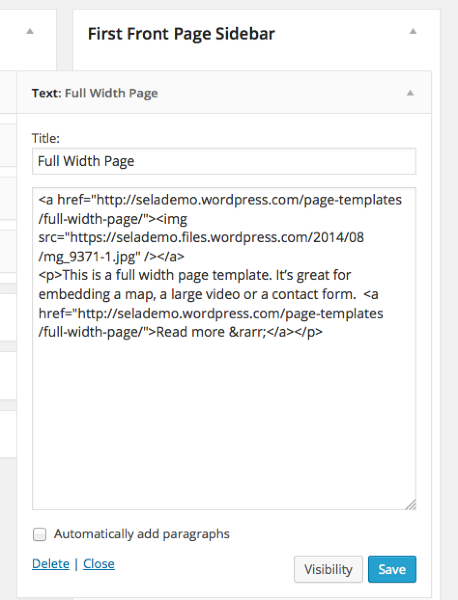
You can put any types of widgets you’d like in those three widget areas.
-
-
-
I was having these same questions and looked at Jennifer’s blog to see if she figured it out. Apparently because she’s using a new theme now :)
-
I was having these same questions and looked at Jennifer’s blog to see if she figured it out. Apparently not because she’s using a new theme now :)
-
@ alissachristine,
Since each of jenniferjunejohnson’s questions was answered appropriately, in some cases with links to support pages, if your questions are the same, then I would suggest that you use the answers provided above. If not, then I suggest you described the issues you are experiencing, either here or in a new topic, here: https://en.forums.wordpress.com/?new=1.


- The topic ‘Sela Theme: Front Page layout similar to theme demo’ is closed to new replies.
 WordPress.com Forums