Sela Widget Missing
-
Hello,
I am trying to use the Sela theme, in order to create a grid layout for my blog, however, when I was going through the walkthrough of setting up the layout, I couldn’t advance. Is this because in the widget section, I don’t have the option for the Front, second, or Third-page widget option. Is a limitation the theme has if I’m using WordPress Free Plan?
The blog I need help with is: (visible only to logged in users)
-
Hi there!
I see Recent Posts widget in the Front Page Widget Area, so maybe you’ve sorted this out? (Widgets there can be edited in Customize > Widgets.)
Let me know if you’re still having any problems accessing it and I’ll take a look!
-
I am having the same issue. I can see the option for the Front Page Widget option when I am on my dashboard and I select widget, but if I go to customize –> widget, there is no option for Front Page Widget.
Blog is https:/joeyjurek.wordpress.com
-
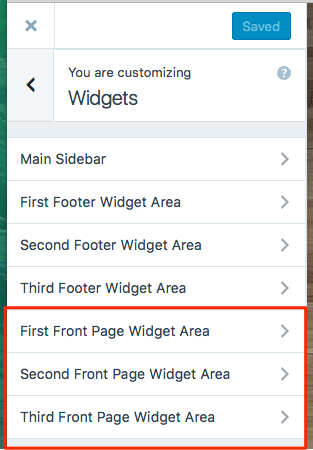
Hi @joeyjurek, when I go into Customize > Widgets on your site, front page widget areas. Screenshot. You can add or edit the widgets either in the Dashboard or in the Customizer.


- The topic ‘Sela Widget Missing’ is closed to new replies.
 WordPress.com Forums