

Select a Plan – Free – doesn’t work
-
When I try to select the ‘free’ option for a Plan, it said ‘something went wrong’. I tried that for a few times, but every time is the same message on the screen.
-
Hi there:
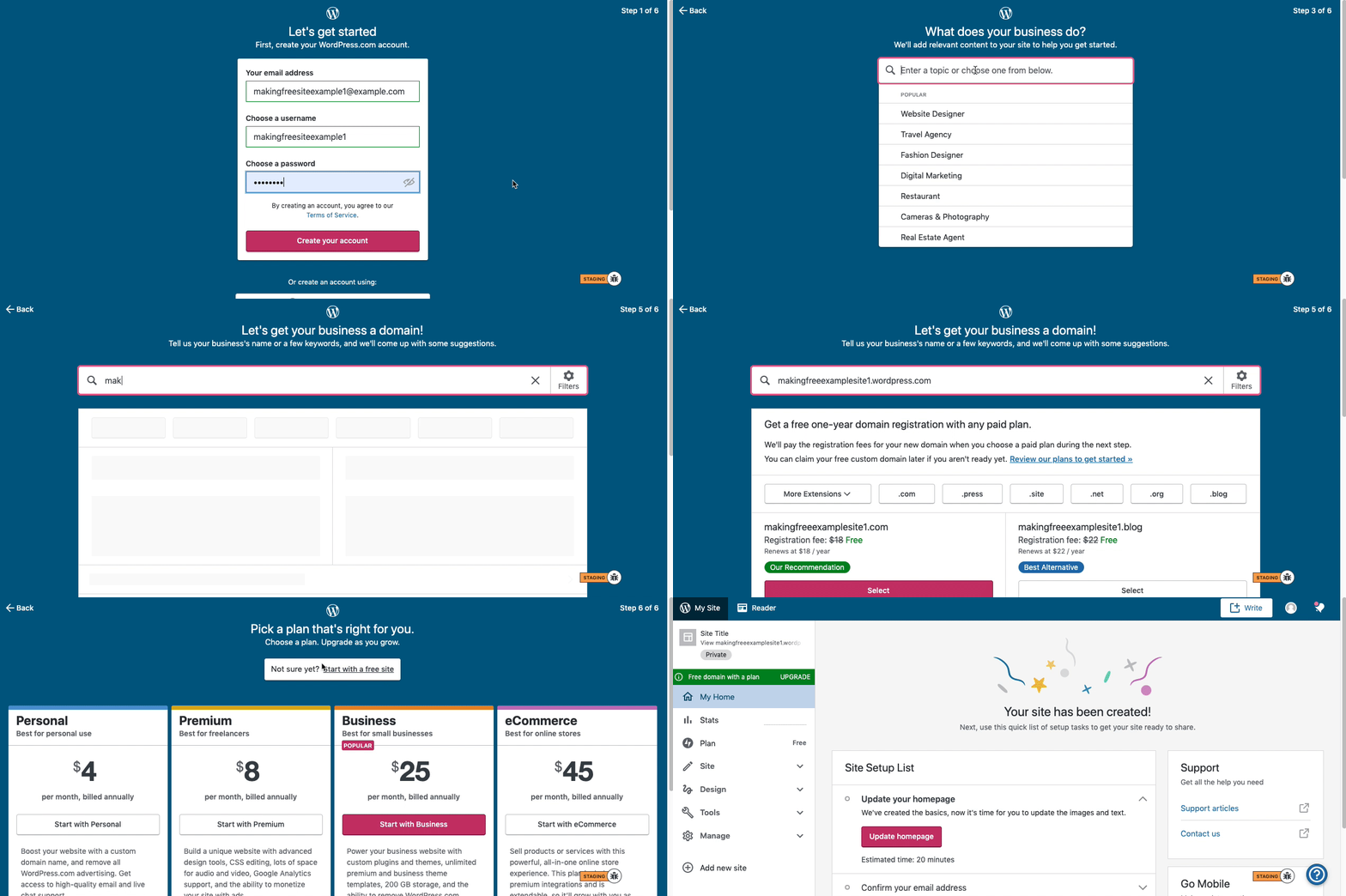
Can you try these visual instructions on how to create a free
.wordpress.comsite:Step 1: Select email, username, and password.
Step 2: select Blog for a.home.blogfree site or Business for a.wordpress.comsite.
Step 3: Select the Topic of your site.
Step 4: Type in the Title of site (optional).
Step 5: Type in the full, exact site address you want including the.wordpress.comor.home.blogsubdomain (ex:freeexamplesite.wordpress.com,freeexampleblog.home.blog). The first option should be the free site that you manually typed in. Click select next to that option.
Step 6: At the very top, click the link that says: start with a free site.Then, your free site should be created! Please follow those steps and if you have any questions, let us know. Thanks!


- The topic ‘Select a Plan – Free – doesn’t work’ is closed to new replies.
 WordPress.com Forums