

Set my WordPress so my Gravatar icon shows up on the Google Chrome tab
-
Hello!
I have a WordPress blog that I connected with my Gravatar account.
For a short time, my Gravatar image would show on the tabs of my wordpress sites on Google Chrome. and I liked it! =)
However, eventually, it disappeared….
My gravatar icon stopped showing up on my Google Chrome Tab.. :(
How can I make it so that I see my image is seen on the Chrome tabs.Also, how can I make it so that my Gravatar icon shows up on Google when my posts show up on the Google search results?
Thanks!! =)
The blog I need help with is: (visible only to logged in users)
-
Are you referring to the icon shown here (blank page)?

If so, you can upload a custom image following the instructions here:
http://en.support.wordpress.com/avatars/blavatars/
Regarding the Google search results, can you explain a bit more about what you’re referring to? Currently, your blog is appearing like this:
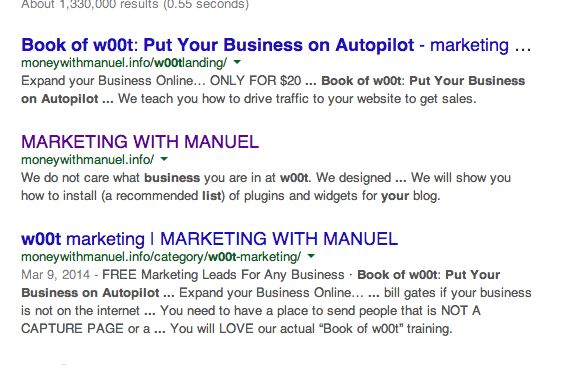
Are you wanting your image to appear alongside your content within search results? If so, you may want to look into connecting your Google + account as demonstrated here:
http://en.support.wordpress.com/google-plus-profile/
When you connect your Google + account, it provides Google with a bit more information regarding who authored your posts/pages. Then, your image will display in search results to Google + connections. Does that make sense?
Let me know if I misunderstood your question!


- The topic ‘Set my WordPress so my Gravatar icon shows up on the Google Chrome tab’ is closed to new replies.


 WordPress.com Forums