

Set up
-
Hi
I would like to have a static welcome page, but not with a contact form as it is today. On the “home” page I would also like Social media tabs, Insta, facebook, tumbler, twitter and also the facebook feed. Also link the blog directly to tumblr
On the other pages I want to take away the contact form and just keep it on “contact” page
How to go in and edit the information on the pages, for ex adding treatments?
I need to get my page well set up now!
Many questions! Thank you!The blog I need help with is: (visible only to logged in users)
-
Also please link the email to (email visible only to moderators and staff). It is important that it works like a website, not a blog!
-
Hi there,
After looking into your account, I found that you did not set a static Front page as seen in this screenshot:
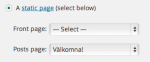
Please create a static Front page and select that to be your Front page by going to Settings > Reading in your Dashboard.
You can add Social Media buttons to your sidebar or footer through this support guide:
http://en.support.wordpress.com/add-social-media-buttons-to-your-sidebar-or-footer/
Also, I’m not seeing a contact form on every page. Are you talking about the ability to comment? If you want to disable comments on all pages, please go to Pages > All pages in your Dashboard. Then select all pages by checking the box left of “Title”. Then, go to the drop down menu labeled “Bulk Actions” and select “Edit”. Click on “Apply”, and you will see another dropdown menu next to “Comments”. Select “Do Not Allow”, and click “Update”.
This should disable Comments on all the pages you checked off.
You can edit each page by going to Page > All pages in your Dashboard. You can go in and edit any page you want.
Also, after looking into your account, I see that the email is as you stated.
Cheers!


- The topic ‘Set up’ is closed to new replies.


 WordPress.com Forums