

Setting the pages in order.
-
My site opens on a post page, not the page I intended to be page one. Can pages be ordered? Also, can the order in which the widgets in the side bar be ordered (rearranged into a different order than they are showing up, now?)
The blog I need help with is: (visible only to logged in users)
-
Hi Brenda!
Currently, the front page of your blog is set to display your latest blog posts. This means that any time you publish a new post, it will automatically be added to the top of your home page.
It sounds like you want to setup a static (not changing) front page instead. Is that correct? If so, you can do that following the instructions here:
Regarding the widgets, you can certainly change the order. To do so, you can drag and drop the individual widget tiles into the new order:
https://mtnst14.wordpress.com/wp-admin/widgets.php
For example, if you click “Pages”, you can drag that to the top of the widgets panel.
Give that a shot and let me know if you have any additional questions!
-
I am still having trouble in order of presentation of my pages. I changed the widget order by dragging and dropping, but then when I go to my website, the widget order is unchanged from what I had, previously.
I am assuming that this is the problem with the page order. I mean, by ordering the widgets in the sidebar, that affects the order in which the pages are presented, right?
-
Hey Brenda!
In order to clarify the individual aspects of your site and make sure we’re on the right page, I created a screen diagram:
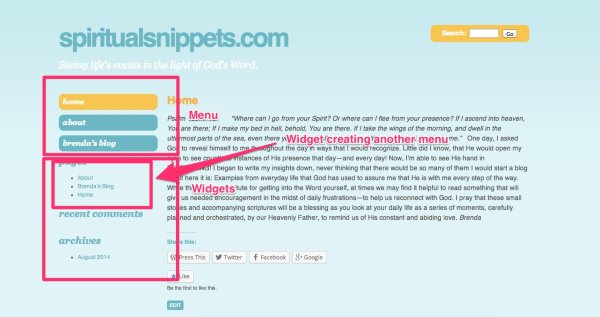
When you click that CloudUp link, you should see a few boxes and labels identifying several parts of your sidebar. Let’s start at the top:
The menu within the oval shapes at the top of your sidebar is controlled by the order of the pages here:
https://mtnst14.wordpress.com/wp-admin/nav-menus.php
If you would like to change the order of those pages, follow the instructions here:
The second area, labeled “Widgets” in my diagram is a series of the following labels: Pages, Recent Comments, and Archive.
The order of those areas is controlled by the order of elements on your Widgets page here:
https://mtnst14.wordpress.com/wp-admin/widgets.php#available-widgets
In order to reorder those elements (say put “Recent Comments” above “Pages”), you’ll need to re-order the widgets by dragging and dropping them.
The third area (the Pages within the widget area) is managed by the individual Pages widget shown on your widgets page here:
https://mtnst14.wordpress.com/wp-admin/widgets.php#available-widgets
If you would like to change the order of pages within that widget, I would actually recommend switching to the Custom Menu widget shown here:
http://en.support.wordpress.com/widgets/custom-menu-widget/
This way, you can manage the order of the pages through your menu page here:
https://mtnst14.wordpress.com/wp-admin/nav-menus.php
Basically, through your menus page, you create and order a menu. Then, the widget displays that menu in your sidebar. Does that make sense?


- The topic ‘Setting the pages in order.’ is closed to new replies.
 WordPress.com Forums