

Share button problem
-
I got sharing button on this post http://gledja.wordpress.com/2014/08/28/iphone-6-najava/ (deljenje) but not on this one http://gledja.wordpress.com/2014/09/07/samsung-galaxy-note-4/ … What should i do to have the sharing (deljenje) option for every post i make?
The blog I need help with is: (visible only to logged in users)
-
I click post titles and see sharing buttons at the bottom of both posts just as expected. I am using Firefox 31 on Windows 7.
Check your settings please. Dashboard > Settings > Sharing
Show buttons on
__Front Page, Archive Pages, and Search Results
__Posts
__Pages
__Mediascroll down and click “save changes”
If you still cannot see theme then you have a browser related issue. Please work through what follows and report back.
1. If you are not running one of the browsers and versions listed at http://browsehappy.com/ please try upgrading or switching first.
2. If you are using an IE browser in compatibility mode please disable that mode. http://windows.microsoft.com/en-us/internet-explorer/use-compatibility-view
3. If you are running one of the browsers and versions listed at http://browsehappy.com/
(a) Try clearing your browser’s cache http://www.google.com/support/accounts/bin/answer.py?hl=en&answer=32050
If applicable see here for instructions on how to clear the cache for Chrome and Safari on the iPad:
http://browsers.about.com/od/howtousemobilebrowser1/ss/safari-ipad-clear-cache.htm
http://browsers.about.com/od/howtousemobilebrowser1/ss/How-To-Clear-Browsing-Data-In-Chrome-For-Ipad_6.htm(b) Make sure that you have both third-party cookies enabled and JavaScript enabled
http://en.support.wordpress.com/third-party-cookies/
http://www.google.com/adsense/support/bin/answer.py?answer=12654(c) Disable all browser extensions or add-ons temporarily.
(d) Try enabling HTTPS: http://en.support.wordpress.com/https/
Add both *.wordpress.com and *.wp.com to your list of trusted sites under the Security tab. Make sure to uncheck the box for “Require server verification (https:) for all sites in this zone.” http://en.support.wordpress.com/https/#frequently-asked-questions
4. You can use this link to see if your flash is up to date. http://www.adobe.com/software/flash/about/ If it’s not then go to http://www.adobe.com/products/flashplayer/ and download and install the latest version of flash.
5. Try using another browser.
6. If you are not successful let us know:
(a) Exactly what kind of device you are using to connect to the internet and to WordPress.com.
(b) Exactly which browser (and version of it) you’re using by checking here if necessary http://supportdetails.com/
(c) Exactly what you experience including what any error reports you receive state. -
Tried it but didnt work…Still got sharing (deljenje) option just for the first post i made…
-
As U said before I can see sharing buttons on both.
That means you have a browser related issue.
We need your details so post them here please. -
I use opera browser but i tried to open my blog via IE and Google chrome… Only option in second post is Reblog…Not Fb,twitter nor G+ sharing option
-
-
Exactly which versions of Opera, IE and Chrome are you using? Staff need to know that.
Yes, please post a screenshot. You can use http://snag.gy/ to share screenshots. Or you can use the WordPress.com guide I linked to and upload it to your Media Library, and return to this thread to provide the file name so Staff can examine it.
-
-
I framed the sharing (deljenje) button that doesnt appear on the upper post. Just for the first (iphone) post
-
Thanks for the added info and the screenshot for Staff. Please be patient while waiting.
-
-
-
@ngledja-
Hi there,
I am unable to reproduce this issue on any of my browsers (Chrome, Firefox or Safari) as I can see it here:
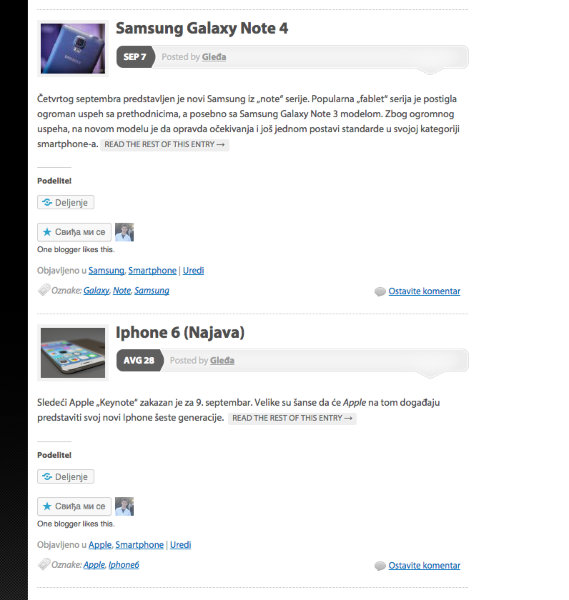
Is it still happening on all of your browsers? Can you please try clearing out your cache and cookies using the guide below again?
If it’s still not working can you try viewing your site on another computer? Let me know if you encounter the same issue.
Thank you!


- The topic ‘Share button problem’ is closed to new replies.
 WordPress.com Forums