

sharing buttons don't show
-
my blog is http://rachelm.wordpress.com and I have all the settings done correctly I believe to have the buttons showing behind a share button, and they don’t appear. I am not using a plug in, and I’ve deleted my cache. What am I missing to make them appear? I’m using the hemmingway rewritten theme.
The blog I need help with is: (visible only to logged in users)
-
When you go to Settings > Sharing > Enabled Services, do you see you see your services listed there like so?
https://cloudup.com/ciMP79klhQeThere’s more information on sharing in this support article.
-
Yes, here’s a screen shot of how it looks: https://rachelm.files.wordpress.com/2015/03/capture.png
-
That looks correct. What items do you have checked in Show buttons on?
-
thx. here’s a screen shot of how it looks: https://rachelm.files.wordpress.com/2015/03/capture2.png
-
One thing that confused me with the new editor is that when you select a button, it looks like it’s disabled rather than enabled (in my opinion anyway). In my screenshot, the circled buttons are enabled:
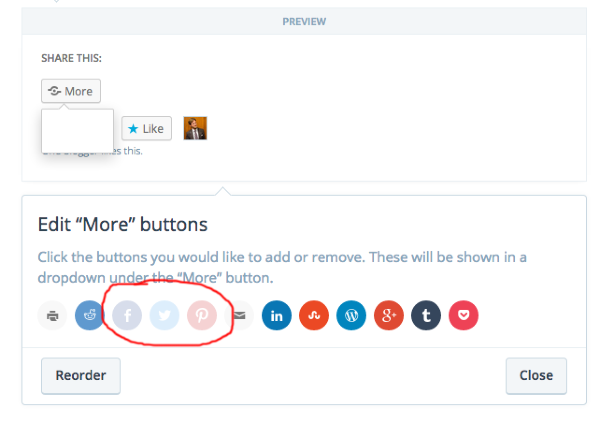
If that’s how you’ve selected your buttons, then I can’t see anything wrong with how you’re doing it and we’ll have to flag staff to take a look.
-
Brian, thank you for whatever you did to make it work! Today when I opened up the site, the sharing buttons were working perfectly. many thanks again.
-
I’m just a volunteer, so I’m not able to do anything that affects your site, but I’m glad to hear it’s working now! :)
-


- The topic ‘sharing buttons don't show’ is closed to new replies.
 WordPress.com Forums

