

Sharing to social media and image preview display
-
Hi,
When I try sharing a blog post to Facebook and Google+, it will only give me the header image to preview with the link to my post. I have managed to do this successfully before, like when my post has a video on it, it would let me post it to facebook and Google+ and showed me a preview from the video, but today and yesterday it only gives me the option of showing the preview of my header image or the wordpress logo.
This sort of sucks, because no one will click on my link if I keep displaying the same image to them. I pinned it on Pinterest, and it worked fine, and showed the preview of the youtube video, so I don’t know if it is the video link that is dodgy, or why it won’t work with Facebook or Google+.I hope you can help, it makes it more difficult to share my blog to the public! And it is gutting since it has worked fine before.
Thanks,
KAThe blog I need help with is: (visible only to logged in users)
-
Hi KA,
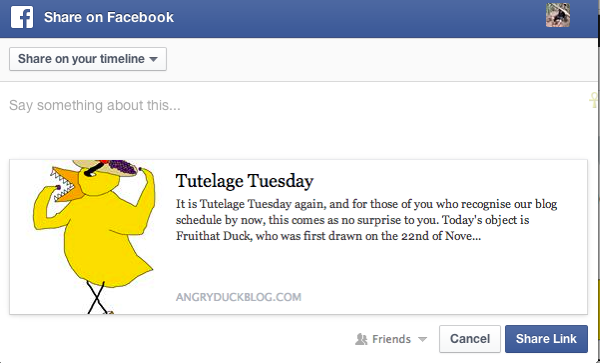
Currently, your latest post “Tutelage Tuesday” is allowing me to select the image within the post when sharing to Facebook as shown here:
I’m experiencing the same result on Google Plus:
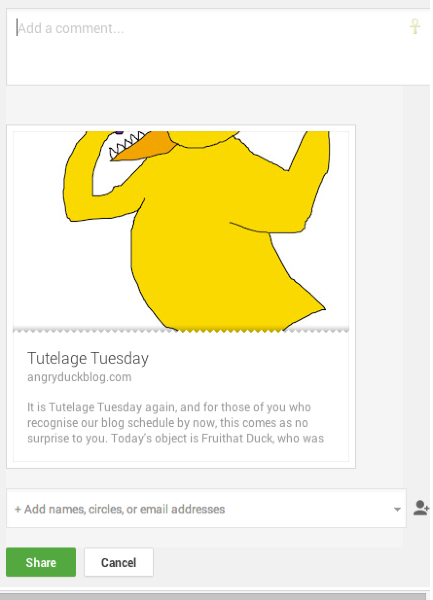
For your post “Mupdate Vlog 3”, you will need to specify an image within the post (like a Featured Image) to accompany the post when being shared to other services. Does that make sense?
Can you try setting a featured image for your next video-only post and let me know if that helps to clear up the situation?
-
Hi thanks for your reply. I have looked for featured image but it isnt in the screen options on any page.
Will this only be available when posting a new post?Is there something i need to do to make the featured image option appear?
Thanks for help
-
Howdy,
Yes, featured images are only available on posts, not pages. So, you won’t find that particular setting on the Edit Page screen. However, it should pop-up on an Edit Post screen. Please let me know if you don’t see it for a particular post!
-
It isnt available for the mupdate flog 3 that we are trying to fix, and i just checked it isnt there any time in the edit post bit
-
Ah! That’s an exception I missed. Currently, the post format for that post is set to “Video” as shown here:

In order to see the Featured Image option, you’ll need to change the post to “Standard”. Give that a try and let me know if it fixes the issue!
-
Hi jeremey sorry I forgot to reply.
I changed it to standard it still didn’t work.Seems strange as it is only this one post we are having problems with.
David
-
Hey David,
That’s my fault entirely. It looks like the Wu Wei theme doesn’t support featured images. So, the issue is that the post doesn’t have any image within the post nor does it have a featured image set. In that case, when sharing to social networks, it grabs another image from your site (likely the header image). The only way around this would be to insert an image within the post that’s at least 200×200 px in size. Otherwise, the social network doesn’t have an image within the post to select from. With Pinterest, it appears as though you can select the video screenshot as an image. However, that isn’t possible on Facebook.
Going forward, the way around this would either be to upload an image to the post or select another theme that offers featured images. Those themes can be found here:
http://theme.wordpress.com/themes/features/featured-images/
Let me know if you need anything else!
-
Ahhh right.
Thanks for letting me know, will do what needs to be done for the future!
Thanks
David -
-
I still find it strange, because on our blog on Thursday, Kattface Thursday, we uploaded a video to youtube and shared it on facebook, and it previewed the video exactly how we wanted it. We did the same today, and it just wanted to preview our header image again. I don’t understand it, because we did exactly the same thing as Thursday, but it did not work. The cat video was only 15 seconds but the video today was 2 minutes. But it has worked with longer videos before too. It just seems temperamental and unpredictable and random when it works or not.
Thanks for your help, though! -
That’s extremely strange. I played with this a bit and looked through the links on your posts. It appears as though if you embed the full YouTube URL, the preview image is correct. However, if you use a shortcode from YouTube instead, the image isn’t set correctly. So, the difference would be the following:
vs.
The posts where you use the latter rather than the former appear to be working correctly. Can you give this a try in your next post and see if it sets the featured image on Facebook correctly?
-
Hi,
I will try! I have made every blogpost in the same way I thought, but I will check this out.
Thank you! -
It looks like some have the short link and others have the full link. I believe you’re going to want to use the full link. Let me know if that makes a difference with your future posts!
-
Hi, using the long link worked! Will be doing this from now on :) Thanks for everything!
-
Great to hear! I’m glad we were able to get to the bottom of this. Please let me know if you need anything else.


- The topic ‘Sharing to social media and image preview display’ is closed to new replies.
 WordPress.com Forums