ShopStyle (Collective) Widget
-
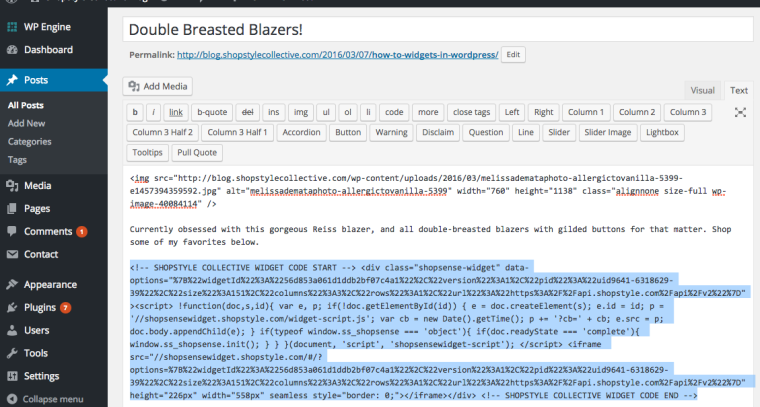
I am trying to add a ShopStyle widget to my fashion blog post so that members can easily see fashion options and click to shop them. I paste the HTML code they give me for the widget into the ‘Text’ editor on my blog post, Save, then in the Preview the widget doesn’t show up. Instead it is just showing a portion of the HTML text, half of which is clickable and when you click it, it does open another browser tab which contains the widget. But I want the widget visible on my actual blog post! Please help :)
The blog I need help with is: (visible only to logged in users)
-
WordPress.com limits the kinds of code that you can include on pages and posts. It sounds like you are trying to use code that is not permitted, and it is being removed out when you save your page.
Depending on the code, it may work to place it in a text widget in your website sidebar.
Hope this helps!
-
Thanks so much! I had read something about that possibly being the case, so thanks for confirming! Unfortunately sidebar placement wouldn’t help me much as I only want the items pictures to be seen in conjunction with this particular blog post!
-
There is no e-commerce capability here. There is no secure payments system here at wordpress.COM and you cannot add a shopping cart to sites hosted by wordpress.COM. See: Moving to Self-Hosted WordPress
https://move.wordpress.com/E-commerce plugin options have been removed here at WordPress.COM. Secure payment systems are not available here at wordpress.COM. You need a wordpress.ORG install. Please read this https://en.forums.wordpress.com/topic/e-commerce-22?replies=17#post-2575955
Provided you are selling only what you yourself make or a service that you personally provide on a wordpress.COM site you have two options.
(1) PayPal – Know that the only instructions that will work for posting a PayPal donation button on a WordPress.com blog are found here http://en.support.wordpress.com/paypal/
Note that the PayPal email link is not supported and PayPal customization options are not supported either https://en.forums.wordpress.com/topic/paypal-button-41?replies=12#post-2517229 This is not likely to be changed any time soon, if at all.(2) If you set up an eCommerce site somewhere else online you can create a custom menu http://en.support.wordpress.com/menus/ and include a custom link to that site in it. http://en.support.wordpress.com/menus/#adding-custom-links
Some bloggers create a contact form https://en.support.wordpress.com/contact-form/ on a page and after the people have made a PayPal donation they provide the link to a private page for downloading files. Maybe that will work for you.
http://en.support.wordpress.com/pages/
http://en.support.wordpress.com/pages/page-visibility/ -
Note: As melindahelt stated above we have code restrictions at wordpress.COM. No javscript widgets or iframes from unsupported sources or third party advertising codes can be used on any wordpress.COM hosted sites.
https://en.support.wordpress.com/code/
https://en.support.wordpress.com/code/#html-tags -
It’s is not a shopping cart or item I’m selling personally, just a widget from ShopStyle (Collective) that allows them to scroll thru various item photos and click one to be taken to a new browser tab to that company’s website. I am not sure if the widget has JavaScript or not, how can I tell? If it helps I could copy the HTML code here so you can see it… Thanks for all the help ladies!
-
If it helps I could copy the HTML code here so you can see it…
You don’t need to do that as I already checked and the code is an iframe from an unsupported source.
http://blog.shopstylecollective.com/wp-content/uploads/2016/03/Screen-Shot-2016-03-07-at-3.49.40-PM-e1457396262109.png
You will not be able to use it. -
-


- The topic ‘ShopStyle (Collective) Widget’ is closed to new replies.
 WordPress.com Forums