

Shoreditch – Remove Sidebar on Blog
-
I’m using the Shoreditch theme.
Is it possible to remove the sidebar on the blog page? I don’t see the full-width page attribute available for the blog page. Am I missing something?
The blog I need help with is: (visible only to logged in users)
-
Page templates can only be applied to static pages, not the blog.
To remove the sidebar on the blog without custom CSS, use the widget visibility feature to add a condition to each widget to hide it on the Posts page.
Screenshot of your settings for each widget:
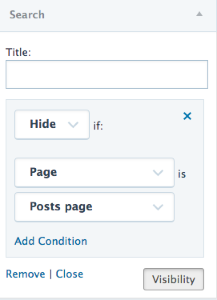
Let me know how it goes.
-
Hi Kathryn,
Thank you for this advice. This works (partially). I want a full page template option for the blog, like I do for all the other pages.
Hiding the widgets does not force full width; it simply removes the sidebar but leaves a bunch of empty space.
It seems like a bit of an omission (on the part of the theme author) to allow full-width on every single page except for one. If you’re going for a consistent look across your website, it’s impossible unless you put a sidebar on every page.
The best I’ve found so far is to use the Panel Page template for the front page (because I like it) and then to use the sidebar on the other pages.
It’s just strange because I can go full width on the home page, the about page, the contact page (and any other page I create), but I am forced to use a sidebar on the blog page and blog posts. Kind of weird and a design flaw in my opinion.
If it’s a way to force users to upgrade, then shame on WP for that! If you’re going to offer free websites, at least make them so that they can be reasonably designed.
I’m all for upgrading for getting a domain name, adding custom CSS, upgrading support options, etc. That’s a good business model. But the free versions shouldn’t be crippled in weird ways (like this).
Just my opinion and my small rant.
I still really appreciate what WordPress gives to the world for free. It’s a pretty amazing offering.
-
It’s just strange because I can go full width on the home page, the about page, the contact page (and any other page I create), but I am forced to use a sidebar on the blog page and blog posts. Kind of weird and a design flaw in my opinion.
I definitely get it and I hear your frustration. Because the “posts page” (i.e. blog) in WordPress is not treated as a regular static page in WordPress, page templates just don’t work with it. I realize that this has created a frustrating situation for you in this case. It’s definitely not a way to “force” you to upgrade — it’s a WordPress-wide phenomenon which affects self-hosted sites as well.
Just my opinion and my small rant.
No worries, rant away. :) Some of the ways WordPress works can definitely be frustrating. Thanks for sharing your feedback.


- The topic ‘Shoreditch – Remove Sidebar on Blog’ is closed to new replies.
 WordPress.com Forums