

Show project tags
-
I would like to show my project tags in a widget, preferably the same as the ‘tag cloud’, but with the tags used in the portfolio option(so just the tags, no pictures). I’m using the Illustratr theme.
Any ideas?
The blog I need help with is: (visible only to logged in users)
-
Hello @clairevkuijck,
The Tag Cloud widget should have an option to select the type of tags you wish to display, called “taxonomy” – see this screenshot:
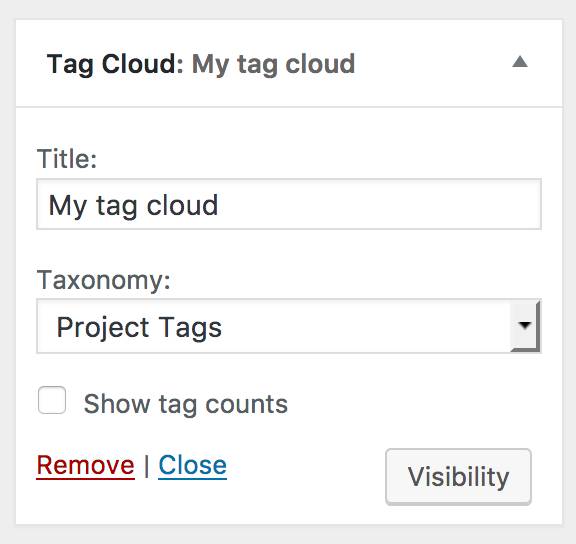
Then you would select “Project Tags” to display project tags.
Based on our testing, though, this is displaying inconsistently on some sites and not others. I’m trying to find out if there’s a bug, but in the meantime, can you try this and me know if you can see this option or not?
Also, to double-check, can you confirm which site you’re using this option on, and what plan you have?
Thanks!
-
Hello @uxcitizen
Thank you for your response.
I can’t find the taxonomy option, it doesn’t show up when i add the Tag Cloud widget. Shouldn’t i be able to find it in Costumize – Widgets?
I want to use this option to show all the project tags that i attached to portfolio entries/projects.
-
Hi there @clairevkuijck,
Yes it should be in Customize > Widgets, but from what I can tell it is not displaying on every site. (That’s a problem!)
Just wanted to let you know you are not alone in having this problem – actually I tried it on two different sites and I did see the taxonomy option on one site and didn’t on another.
I am tagging this thread with “modlook” for future staff follow-up.
-
Hi there,
Regular WordPress.com sites don’t have the option to select different taxonomies for tag clouds. The tag cloud widget can only display regular tags from posts. There is no way to display project tags in a similar way.
@uxcitizen, you took that screen shot on a Business Plan site using plugins. Those sites work differently from regular WordPress.com sites.
-


- The topic ‘Show project tags’ is closed to new replies.
 WordPress.com Forums