side bar issue – text widget after post
-
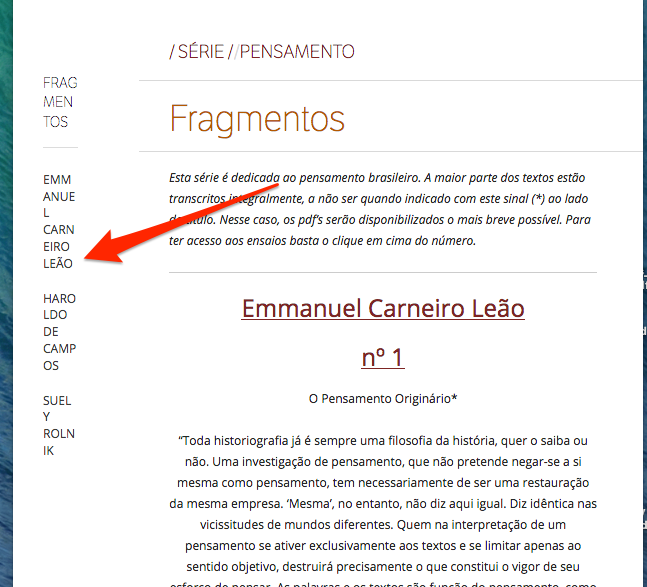
Hey! I was wondering why my text-widget on the sidebar is showing after the post content, not besides it? It seems that the whole sidebar is only appearing at end of the page… My guess is that some CSS is bugging it, but I couldn’t figure it out…
You can notice the issue here: https://revistausina.com/2017/01/01/fragmentos/
Thanks a lot!
The blog I need help with is: (visible only to logged in users)
-
So I’m still trying to figure it out, but I’m running on some problems.
I noticed that the sidebar appears if I reduce the site-content width, but then the whole website is compromised. Is there a way to address the .site-content width only on specific posts?
-
As I mentioned in the other thread, you have a number of things in your custom CSS that are causing issues. The widget is staying beside the content for me, but it gets tiny narrow and cannot be read.
Screenshot: https://cldup.com/v4vCYhdgRL.png
My suggestion is to copy all of your custom CSS out and put it into a plain text file for safe keeping and the delete it all and start from scratch. With nearly 200 lines of custom CSS, trying to fix all the issues would be a monumental task.
-
Hey thesacredpath! Thanks a lot for all your help over the past years, I feel I haven’t been grateful enough to you…
With your help I’ve relocated the categories as you said in the other post. And I think I’ve managed the mobile responsivity and the overall sidebar issue as well. Correct me if I’m wrong, cause I only have a few devices to test on.
About starting from scratch, I’ve already did that at the beginning of this year, since you’ve already have recommended me that. I really think it fixed a lot of the issues I was having, but it was a tremendous task as you’ve just said…
The only specific thing I’d like to ask you now is how to address the .site-content width of only a few posts/pages (where I have the sidebar working). I’m not sure if it’s possible to do that, but it’d be great. Right now I had to reduce ALL the pages/posts width to make the sidebar fit only on some of the posts, whereas other posts that I do not have a sidebar on remain with a big empty space on the side…
Sorry for the long reply and thx again!
-
Also, could you tell me if it’s possible via CSS/HTML to make some images on posts appear full screen width? Like this page for example: http://thevinylfactory.com/films/ ?
Thanks again :)
-
No worries, and you are welcome.
In the HTML for each page, in the opening body tag, there will be a unique page id or post id CSS class that will look like this (I’ve used Sobre in this example).
page-id-449
As an example, you can use that CSS class to set the width of .site-content on that page to the full width of the #main parent element (it was 80%)..page-id-449 .site-content { width: 100%; }The above is similar to how you have used the unique postid-XXXX to set colors on certain elements, such as captions.
If you want to try that and see how it goes, you can always ask for help on it if you run into problems. On the image widths, can you give me a link to an example page/post so I can take a look at the HTML to see how things are structured? Making the image full width can be done in some cases, but in others it cannot without taking the text content to that full width as well (both in the same div).


- The topic ‘side bar issue – text widget after post’ is closed to new replies.
 WordPress.com Forums