

Side navigation Arrows
-
in the Theme Dyad., the left and right navigation side arrows used to navigate between featured contents in the desktop view got lost ( disappeared ) in the mobile view.
how to show them in the mobile view?
in the Theme Dyad.The blog I need help with is: (visible only to logged in users)
-
Hi @fooodnuts, I’m fairly sure this was an intentional design choice: on a tiny phone screen, the featured content area is already quite limited. Left and right arrows that are big enough to easily tap with a finger would take up a fair bit of that space.
Have you tried swiping on the featured content, though?
-
If you have a plan that allows CSS (for example, our Premium plan) you can add this to force the arrows to display.
@media only screen and (max-width: 960px) {
	.site-banner-header:after,
			.site-banner .slick-next,
			.site-banner .slick-prev, .slider-nav {
		display: block !important;
	}
}
Here’s how it looks:
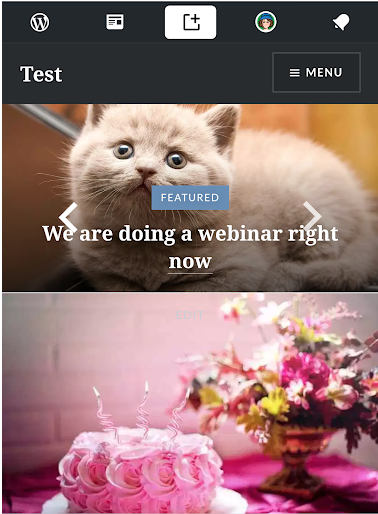
Bad with a long title. Single-word titles are kindof alright — but that’s not great for SEO.
-
I noticed today that, unlike the case with the slider navigation arrows on Dyad 2, on the Dara demo the arrows are preserved at all of the mobile and tablet models that I tested (with the WhatIsMyScreenResolution Multi Screen Test).


- The topic ‘Side navigation Arrows’ is closed to new replies.
 WordPress.com Forums