

sidebar links
-
arrange link order, the video has a order links feature that is not available in the links dashboard
The blog I need help with is: (visible only to logged in users)
-
-
Hi lowercasedave,
Is this the blog you need help with?
http://cmawlocal2511.wordpress.com/
To control the link order, you’ll need to select how the links are sorted by the links widget. Visit your widget settings page in the dashboard. Right now your links are being sorted by their “Rating” tag, largest to smallest:
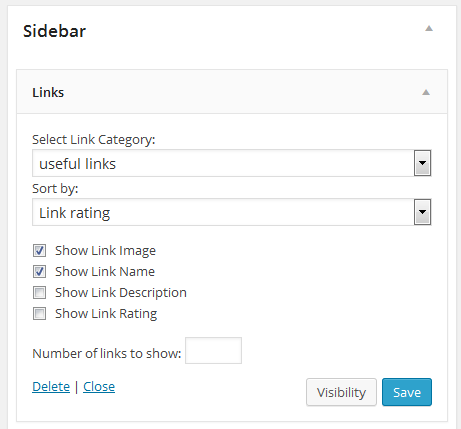
You can instead sort them by their title, Link ID (basically order of creation), or at random. But Rating is probably what you want.
When you’ve chosen to sort by Rating, you can edit how the links are tagged by rating in your links settings in the dashboard. For each link, click “edit” adjust the rating to where you want it to appear in the order, and click save changes.
Let me know if you have quesitons about adjusting those ratings. :)
Best,
-Alex G.
Happiness Engineer | WordPress.com
-
-


- The topic ‘sidebar links’ is closed to new replies.
 WordPress.com Forums