

Sidespied theme
-
I have some questions on the Sidespied theme. One how do you activate the blog function. Two in the portfolio is it possible to have subsections within a project. It seems to me that the only way I can display something in the portfolio is using the featured image. So for example I have four photos I wanted to display under Tuesday. It seems that I will have to have four different projects with different names and show the photos on the featured images for them to be displayed in the portfolio. Is it not possible to have a project that has a featured image under Tuesday and the four actual photos are sub-projects of Tuesday with photos in each of them?
The blog I need help with is: (visible only to logged in users)
-
Hi there,
Please see my answers below:
One how do you activate the blog function.
When you activate the Sidespied theme and follow the instructions for setting up the front page, your home page will be the squared set of images as shown in the demo. You’ll need to create a separate page on your blog titled “Blog” (or something similar). Then, in your Reading settings, you’ll specify that you would like your posts to appear on your Blog page as described here:
That will turn the page “Blog” into a traditional blog page with your most recent posts appearing at the top.
You can find full instructions on setting up the front page under “Portfolio Page Template” here:
http://theme.wordpress.com/themes/sidespied/
Two in the portfolio is it possible to have subsections within a project. It seems to me that the only way I can display something in the portfolio is using the featured image. So for example I have four photos I wanted to display under Tuesday. It seems that I will have to have four different projects with different names and show the photos on the featured images for them to be displayed in the portfolio. Is it not possible to have a project that has a featured image under Tuesday and the four actual photos are sub-projects of Tuesday with photos in each of them?
You’re correct in that the Featured Image is the image that will be shown on the home page for the individual portfolio project. Regarding categorizations, there are two different ways to categorize your portfolio – Project Types (similar to post categories) and Project Tags (similar to post tags). They’re both explained here:
The scenario you’re describing isn’t possible with the home page of the Sidespied theme since the home page automatically pulls portfolio projects rather than links to categories. However, you could categorize your projects under the type “Tuesday”. Then, all of those projects would appear here:
http://afrieethinkingwomandotcom.wordpress.com/project-type/tuesday
That link wouldn’t appear on your home page, but it would work if you linked to it in your sidebar for example. Does that make sense?
-
Hello Jeremy, Thanks so much I worked on what you suggested for the home page and it turned out fine. For the portfolio I created a gallery in each project which has worked brilliantly. Appreciate the support.
Harriet -
-
Jeremy I have a question for you i have mapped my wordpress site to my domain name afrieethinkingwoman.org but when I type it into google it doesnt come up other stuff comes up please assist on how i can resolve this and how I can improve my SEO in general
-
Hi Harriet,
It looks like your site is appearing in Google searches as shown here:
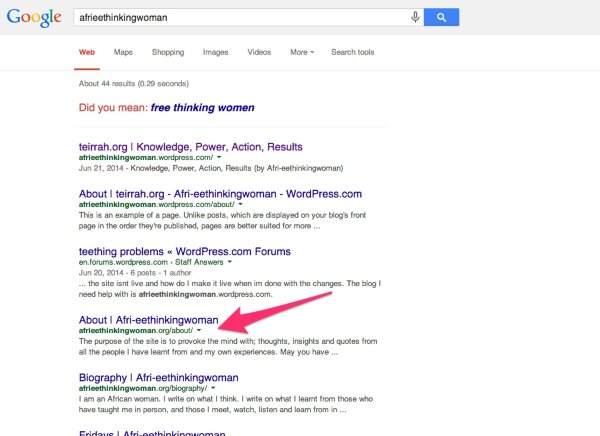
It can take some time before Google updates all links to your site with the preferred domain. Unfortunately, we have no control over how your site appears in search results or how quickly this update is done.
As for SEO, we take care of all of the major things for you. We ping search engines whenever you post something new to your blog. You can read more about that here:
Please let me know if you have any additional questions!


- The topic ‘Sidespied theme’ is closed to new replies.


 WordPress.com Forums