

Sign up is not working.
-
Trying to sign up for Premium. Nothing happening. You want my business or not?
The blog I need help with is: (visible only to logged in users)
-
Nothing is working. Every button I press is inactive. What do I do? I can’t sign up for Premium, I can’t edit a theme. It is as if WordPress really doesn’t do anything. And no help…
-
Every button I press is inactive.
That sounds like a browser related issue. Be sure you are running a browser and version of it found at http://browsehappy.com and you aren’t running any adblocker type of addons.
If you are not successful let us know:
(a) Exactly what kind of device you are using to connect to the internet and to WordPress.com.
(b) Exactly which browser (and version of it) you’re using by checking here if necessary http://supportdetails.com/You must be logged in as Admin http://en.support.wordpress.com/user-roles/#administrator under the exact same username account that registered the blog to access the blog’s dashboard and navigate to > Store > My Upgrades
http://en.support.wordpress.com/my-upgrades/Methods of payment are here http://en.support.wordpress.com/payment/
Billing history is at Store > Billing History
http://en.support.wordpress.com/billing-history/I tagged this thread for a Staff follow up. Please subscribe to it so you are notified when they respond. To subscribe look in the sidebar of this thread, find the subscribe to topics link and click it.
-
Hi there,
I’m sorry to hear that. It seems like what @timethief is saying is correct. It may be independent to your computer set up as I haven’t heard of any similar issues with other users. Can you try can you please try clearing out your cache and cookies using the guide below?
Also, let me know if it works on other browsers like Google Chrome or Firefox.
Thank you!
-
The saga continues…
I signed up using the address ([email redacted]). I did not receive a confirmation email. I cannot login to this account. I have tried resetting the password and doing account recovery. It becomes circular. 1. Login doesn’t work. 2. Password reset doesn’t recognize email. 3. Account recovery says email is already active. Try Password reset. 4. Repeat.
I tried to sign up again using the information with which I set up the account but it has been taken by the original sign up that did not get confirmed.
Nothing seems to work to activate this account.
I have set up a blog under a similar name in this account. However, when I went to post, it showed the username of this account. This is totally unrelated and unacceptable. Removing that would require coding to which I don’t have access. Now I want to create the blog under the correct user name.
Please help…soon.
The blog I need help with is dropincareercoach.wordpress.com.
-
Hi there,
It looks like the email has been verified for dropincareercoach.wordpress.com. Do you still need help with this?
I have set up a blog under a similar name in this account. However, when I went to post, it showed the username of this account. This is totally unrelated and unacceptable. Removing that would require coding to which I don’t have access. Now I want to create the blog under the correct user name.
I see that you set up dropincareercoaching.wordpress.com. This is what that site looks like:
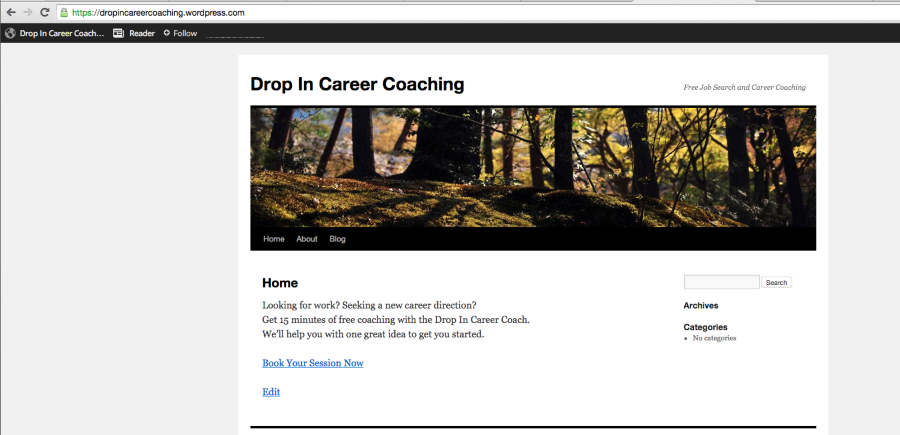
If you want to permanently delete it, follow the guide below:
http://en.support.wordpress.com/settings/delete-site/Make sure you do it here:
https://dropincareercoaching.wordpress.com/wp-admin/tools.php?page=delete-blog
Please read the warnings and advice before deleting a site, as we can’t revert a site deletion for any reason and the site address cannot be reused.
If you want to hide your site instead, you can use the following guide to make your site private so only you and people that you have invited can view the site:
http://en.support.wordpress.com/settings/privacy-settings/As for usernames, the sites you are mentioning are in the account with the username: skateykat. If you want me to move any sites to another account, provide me the site name and the username of the other account you want your site transferred to.
Thank you.
-
Hello and thank you for your reply.
In the skateykat account, the blog is called: dropincareercoaching.wordpress.com
I do not want the skateykat profile information to show on the Drop In Career Coaching blog. Therefore I tried to set up a new account which had to be named differently than the one I set up in the skateykat account.
The new account was set up as dropincareercoach.wordpress.com. This account has not yet been verified. I cannot log in with this ID. This is the one where I would like to have the original blog set up.
It would certainly be helpful to move the blog from skateykat to the dropincareercoach. However, I would not have the first clue how to do it.
In fact, I can’t find the Forums without going to the email link. I can’t find anything in WordPress. It is far and away the most baffling site I have ever been on.
PS. If I could remove the profile information from the blog, I wouldn’t need the new account.
Thank you.
-
The new account was set up as dropincareercoach.wordpress.com. This account has not yet been verified. I cannot log in with this ID. This is the one where I would like to have the original blog set up.
Please note that this is a site, not an account. An account can have multiple sites in it, but if you want a brand new account, log out of WordPress.com and sign up again with a brand new email (or one that is not already attached to a WordPress.com account).
Currently we do not have an account with the username: dropincareercoach. So, please log out of WordPress.com and create a new account with the username: dropincareercoach and new email.
Once that is set up, I can move the site you want into that account.
Let me know if you have any questions with this!
-
Thank you. I have already tried that. WordPress says the account already exists with the email I am trying to use. It says that the username dropincareercoach already exists. So neither DICcoach nor DICcoaching can be used. I am confused.
-
I have responded to you privately. Please check your email and respond from there if you have any questions.


- The topic ‘Sign up is not working.’ is closed to new replies.


 WordPress.com Forums