Site info not at bottom of home page where I'd like it.. Capoverso theme
-
This is for the site:
https://mygoodmeasure.wordpress.com
and not my palmerowen site.My site info won’t align bottom on my home page. It does everywhere else on the site – both posts and static pages. Ideally, I want it to align left with the same margin – left and underneath as it does elsewhere.
This is on the desktop. It does the same on the iPhone and on the iPad, it has disappeared completely!
Any ideas anyone?
The blog I need help with is: (visible only to logged in users)
-
Hi there, you set a color for the site footer in your CSS, but the CSS for the main page is a bit different, so we have to add another CSS rule for the main page. Add this to your custom CSS.
.page-template-home-page-php .site-footer { background: #11121d; } -
Thanks for your response.
By setting the background, does exactly that on the home page! But its still floating under my home nav.
I have been working in Firefox however – so have just checked it out on all other main browsers. And its behaving in most of them (although its not quite the same distance from the bottom as the other pages, which would be nice!) And as I said before, it also floats near the nav on my iPhone and disappeared completely on the iPad.
Is it a Safari/Firefox issue? Can it be resolved?
-
I’ve checked your site in Firefox, Chrome and Safari, and checked a number of pages and posts and the footer area with the credits are all in the same place. Is that what you are talking about?
-
Yes – its position rather than background.
Was the footer at the bottom when you checked? Like I say its not in Firefox and on the iPhone at my end. The versions/platforms I’m checking with are:
– FireFox Version 42.0
– My iPad is 3rd generation with version 7.1 iOS and iPhone is an iPhone 5c which uses iOS 7.1.1 -
This is what I’m seeing in FF 43.0.4: https://cldup.com/bdmX49DhuG.png . Is this what you are meaning by “site info”, or am I not understanding?
On my iPhone 5s with 9.2 on Safari, I’m seeing the footer stuff at the bottom as well. Same on my iPad Air 2 with 9.2, both in landscape and portrait.
-
Aha!! You didn’t read the beginning of my email! This is for another site:
not my Palmer Owen one. Sorry – didn’t realise til now.
Look at the home page on that one and compare it to the rest of the site.
-
On my screens, this just alters the colour of the text but not the position – which is what I’d like more control of.
-
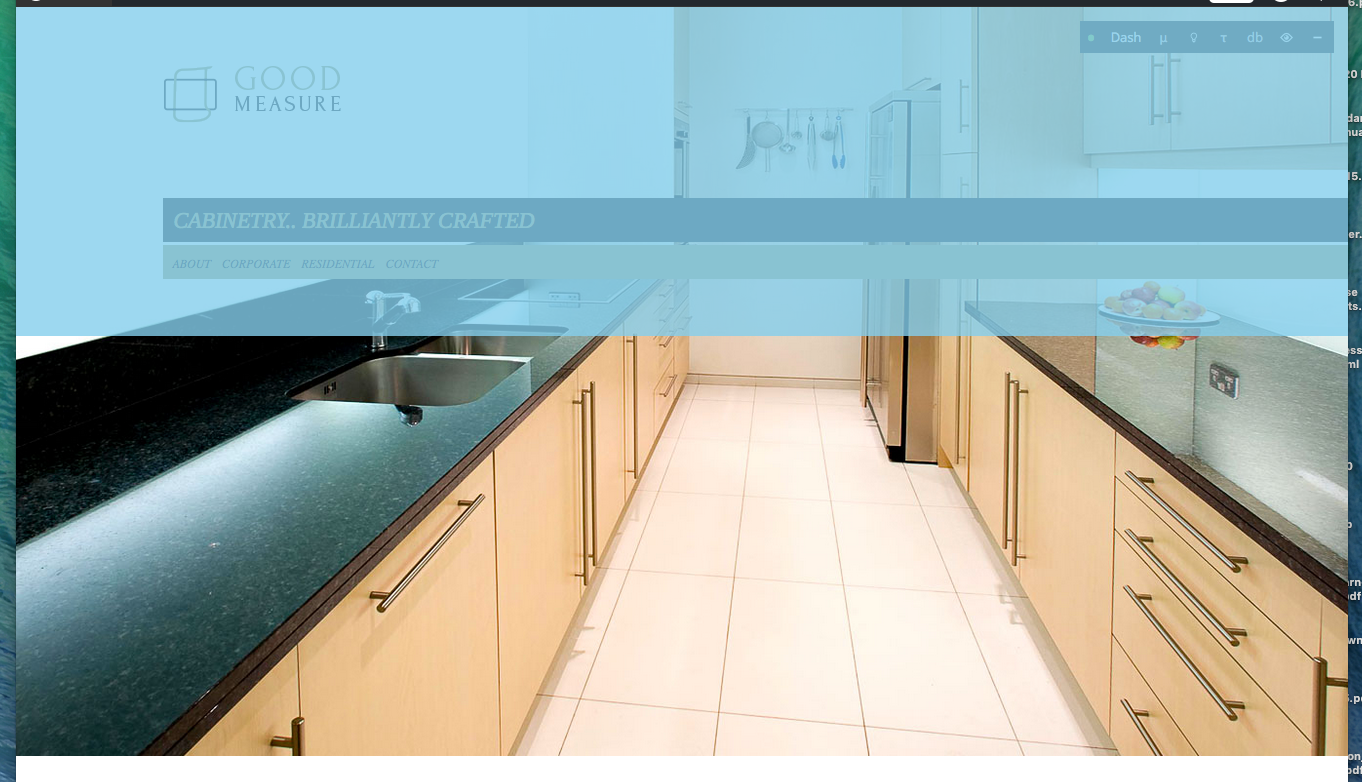
Laura, the main problem is that there is no “content” on the front page, so the #page, #content and #primary divs have completely collapsed to a minimum height, thus causing the body div to collapse as well. The blue highlighted section in this screenshot is actually the body div for your main page.
The site info area is set as position: absolute with a bottom of zero, so it will always stay at the very bottom of the browser window. If we remove the position: absolute, the footer floats up to the bottom of the collapsed body div and ends up right below the menu. Adding to the complexity is that the background image (featured image), which is put in the body div, continually adjusts size depending on browser width, so there is no way to tie the site info div to the bottom of the image. The image is actually being forced outside of the collapsed body div by its CSS settings (background-size: cover; ), otherwise it would be a small image in the upper left corner.
I cannot think of a way to be able to fix this without some extensive modifications to the theme PHP script files, which of course we cannot do at WordPress.com.
There could be a CSS solution to all this, but something this complex is outside the scope of support we provide in the CSS support forum. You might consider posting on http://jobs.wordpress.net/ and see if their is someone that would consider taking this on for you.
-
-


- The topic ‘Site info not at bottom of home page where I'd like it.. Capoverso theme’ is closed to new replies.
 WordPress.com Forums