SiteDeletion
-
Trying to delete site and says to contact support which leads me here…
-
What is the URL starting with https:// of the site you registered under your https://en.forums.wordpress.com/users/nauticahybrid824963323/ account and now wish to delete?
-
When we need Staff help with issues Volunteers cannot resolve like this one we type modlook into the sidebar tags on our forum threads. I did that for you. How do I get a Moderator/Staff reply for my question? https://en.support.wordpress.com/getting-help-in-the-forums/#how-do-i-get-a-moderatorstaff-reply-for-my-question
-
-
What’s essential is the exact URL and the username account that registered the site. Unless you post them now when Staff get here they will have to ask for them, which causes a delay when it comes to getting support.
-
knetic.net
Your site is hosted by a web host other than WordPress.com. Did you link it to WordPress.com using JetPack plugin? If yes, you can disconnect the site from WordPress.com using the steps from https://en.support.wordpress.com/disconnect-jetpack-sites/ page.
-
I honestly have no idea what’s been done. I just needed a quick and easy website. Tried wordpress out (it looks like Jetpack was used, but the article doesn’t match what I see to disconnect).
Moved the site to Wix but now I just get too many redirects and when it does go through it’s to the not set up wordpress site.
The wix site will SOMETIMES go through. All DNS settings updated through GoDaddy
-
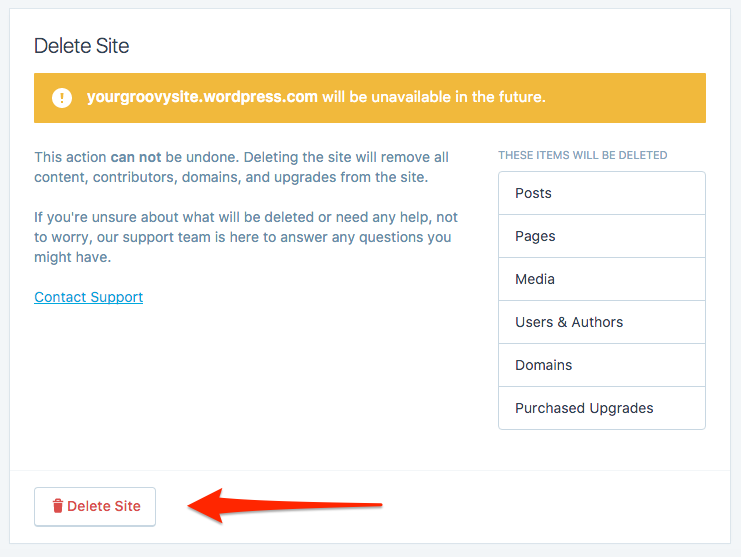
When I follow the “how to delete site” instructions I see everything but the button to Delete Site. It says Contact Support instead, which makes me send a request into this forum (how I got here initially)
-
Did you point back the domain to WordPress.com servers? I see your nameservers are pointing to WordPress.com now. However. when I visit your site, I see Wix site. If you are trying to host your site with Wix, update the nameservers for your site to point back your domain name there. Wait for few hours (approx 72 hours) for DNS propagation. Clearing your browser cache will also be of help. See https://en.support.wordpress.com/browser-issues/#clearing-your-browser-cache
-
On a second thought, did you scroll down to the bottom of the screen? See the image at https://en-support.files.wordpress.com/2011/04/deletesitesetting.png
“Delete Site” option is at the bottom-most part of the screen while “Contact Support” link is little above.
-
I’m following up on the modlook tag here but there’s nothing else to be done. The site isn’t connected to WordPress.com.
-
nauticahybrid824963323 – Are these the instructions that you were following?


- The topic ‘SiteDeletion’ is closed to new replies.
 WordPress.com Forums