

Size of Header & Background Color
-
How about the options of the third option on the top row of the website? How to change the color? Yup, I would like to specify a common system font of Chinese word. How can I install and make it? Thank you.
-
I would like to change the same color for the title of each page. How can I make it? Thanks so much for your reply.
-
Thank you for your reply. How to change the size and color of the options (the top row of the website)?Can I have more fonts for Chinese words?
-
Thank you for your reply. How to change the size and color of the options (the top row of the website)?Can I have more fonts for Chinese words?
-
-
Thank you for your reply. How to change the size and color of the options (the top row of the website)?Can I have more fonts for Chinese words?
I actually already answered those questions earlier, not sure if you saw them. Let me know if I misunderstood.
Yup, I would like to specify a common system font of Chinese word. How can I install and make it?
You would first find the element you want to target, and then add a line like this in your CSS:
.element-name {
   font-family: Name1, Name2, sans-serif.
}
You’ll need to use a browser inspector to find the element – I gave you some resources earlier to help you find each element:
http://dailypost.wordpress.com/2013/08/29/css-matched-rule-pane/
http://en.support.wordpress.com/custom-design/how-to-find-your-themes-css/
The font name has to exactly match what it’s called in the system.
If you have new questions, could please start a new thread rather than continuing to add them here? Thanks.
-
My English is not very well. I followed your instruction to change the color of the options on the top row of the website. The color is changed (purple). However, there’re some sub-options of each options. The color doesn’t change (dark green). I would like to keep the color same with the options and the box of sub-options.
-
Before we look at the sub-menu colours, I noticed something else.
Since you’ve made the menu font larger and it’s now split onto two lines, you’ll need to adjust your heading CSS as it’s being cut off at the top:
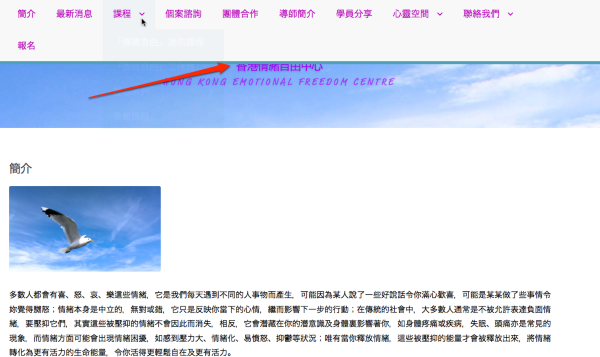
Try adjusting the numbers here to make the heading taller again:
.header {
    background-color: #ffffff;
    min-height: 130px;
    padding-bottom: 5px;
    padding-top: 90px;
}
My English is not very well.
Your English is very good!
However, there’re some sub-options of each options. The color doesn’t change (dark green). I would like to keep the color same with the options and the box of sub-options.
This is what your sub-menus look like right now:
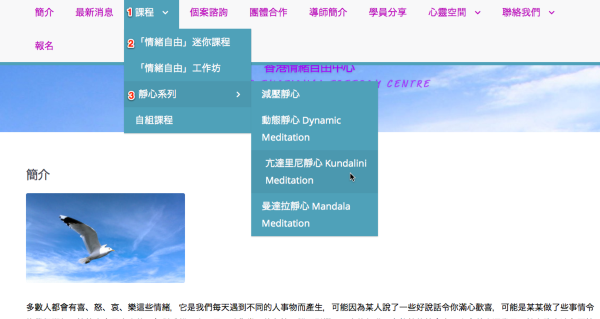
Could you explain which sections you want to be what colour?
Do you want all your dropdown menus to be purple text on the greenish background, or something else
-
I read the website from my computer. The header title is not being cut off.
I want to change the background-color of my dropdown menus from green to purple ( #bb00bb). Also, how to change the color of the title of sub-menus. Thank you so much for your help. -
I want to change the background-color of my dropdown menus from green to purple ( #bb00bb).
Try this:
.main-nav li li {
     background: #bb00bb;
}
Also, how to change the color of the title of sub-menus.
Try this, replacing the colours with whatever codes you like.
.main-nav .highwind-navigation li li a {
background-color: #bb00bb;
color: #000000;
}I read the website from my computer. The header title is not being cut off.
That’s good to hear, but just keep in mind that even though it looks OK on your screen, the header is being cut off for some visitors to your site because of the CSS changes you’ve made. People at different resolutions see the site in different ways, and it’s important to be mindful of that when adding custom CSS that alters the layout. Not everyone sees what you see. :-)
-
Thank you for your reminder. I adjust my heading CSS. Is it being cut off at the top on your screen?
How to change the background-color of the option at the top of the website from green to another color? -
kathrynwp, You are really helpful. You have helped me to solve the problem that lasted for half year.
-
I adjust my heading CSS. Is it being cut off at the top on your screen?
Here’s what I see for the header at laptop-sized screen of 1280 x 800:
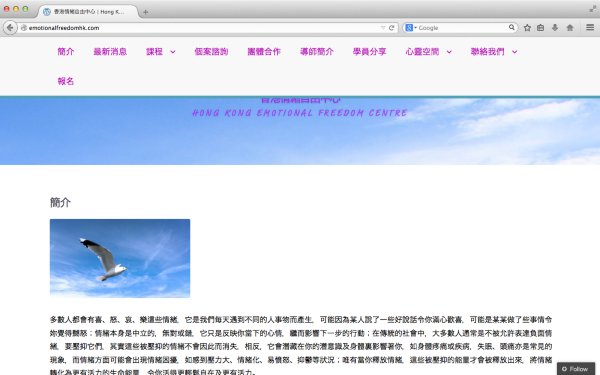
This custom CSS that you have added in Appearance > Customize > CSS editor is causing the size change:
.header { background-color: #ffffff; min-height: 150px; padding-bottom: 5px; padding-top: 90px; } -
How to change the background-color of the option at the top of the website from green to another color?
I think you’re talking about the bottom border on the main navigation. You can add the following CSS to adjust the color of that:
.main-nav { border-color: #703A9B; } -

How to change the color from green to another one as the attached photo from the above link? Thank you.
-
-
How to change the color of Page title and the distance between the header and the page title?
-
I choose DFKai-SB (font of Chinese word) and added in CSS. I can’t find this font from my font list. How can I find this font and change the word in this font?
-
How to change the color from green to another one as the attached photo from the above link?
Ah, I see! Here is an example that will change the text color to white and the background color to purple when you hover over menu items in the main navigation on the Highwind theme:
.main-nav ul.menu > li:hover > a, .main-nav ul.menu > li > a:hover { background-color: #703a9b; color: #fff; } .main-nav ul.menu ul li:hover > a, .main-nav ul.menu ul li.current-menu-item > a, .main-nav ul.menu ul li > a:hover { background-color: #703a9b; color: #fff; } -
I adjust my heading CSS. Is it being cut off at the top on your screen?
I can see more of it. For what it’s worth, it looks absolutely fine the way it is.


- The topic ‘Size of Header & Background Color’ is closed to new replies.
 WordPress.com Forums