

Size of hyperlinked text suddenly larger
-
I added a caption to a photo and in the caption I included the photo credits. After adding the photo with the caption, I highlighted name of the photo owner to add a hyperlink.
But in the preview, the text highlighted for the hyperlink appears huge, and different from the rest of the caption text size. It is the same problem for all photos where I have included a hyperlink; the pictures with just a caption without a link are normal. This has never happened to me before.
Please help me to rectify this problem asap. Thanks
The blog I need help with is: (visible only to logged in users)
-
Hi! Yes, we can help you with this problem. Can you please link us to a published page where we can see this issue?
That will help us troubleshoot it. Thank you!
-
Oh no! The hyperlink got larger?! Sounds dodgy. I would suggest trying again.
P.s. Please comment on my blog!
Quirkyquirkyme.wordpress.com -
I tried it again but the same problem appears. I haven’t yet published it as I was trying to rectify this error first. Should I publish as “private”? If so, is it only viewable by me?
Also, I have another issue with this post layout. I have included two pictures side by side by left justifying both of them. But the text following them is either many spaces below or squeezed at the end of the two pictures in the right hand side, which I do not want. For a long time I tried to solve to the problem, but was only partially successful.
-
If you’re worried about the public seeing this badly formatted post, you could always password protect it and then link it here with the password for us to have a look at it –
http://en.support.wordpress.com/posts/post-visibility/#password-protect-a-post
Sorry, but it’s very difficult to help you with this issue without looking at the post itself.
Alternatively, you could wait for a staff member to see this thread, as they have access to all your posts anyway, and will likely be able to troubleshoot it pretty quickly.
Your call! :)
-
If you select “private” it is only viewable by you. Meaning we cannot help you. I don’t know about password protecting…
-
-
Sadly no, we cannot see the same preview you see, even if you link us.
Perhaps you should wait for a staff member to look into this problem? They will be able to view your drafts and preview the post in question to see what is wrong with it.
-
Ok thanks. I am apprehensive about posting because of all the problems with the page layout as well as this problem.
-
No problem. This thread has been tagged for staff, so they should look at your problem soon! :)
-
-
Strangely, when I added a hyperlink to a new post its fine. Only in this post I’m working on, all the hyperlinks come out in huge text in the preview. I even tried copying some hyperlinks to another post and they appear fine in the preview.
So there’s definitely a problem in my post. -
Why not copy the text (not the hyperlinks!) into a new post then type the hyperlinks again then it will be sorted!
-
Hi the post title is “Inside the Mysterious World of Carnivorous Plants (Part 1—Pitfall Traps).”
The 5th, 6th, and 7th photo in the post all have hyperlinks to the photographer and you can see in the preview they’re all huge. Also, at the bottom of the post, I have more than 20 references with hyperlinks. They too have the same problem.
In the second untitled draft, I copied the references section just to see if the problem occurs.
Thanks
-
Hi,
The post is currently set as a Link post type. Within the Misty Lake theme, posts labeled as “link posts” automatically have the links posted in a larger size. You can see an example of this here:
http://mistylakedemo.wordpress.com/2011/07/07/learn-wordpress/
If you change the post type to “Standard” on the right-hand sidebar, you should be good to go!
-
Thanks a lot. That was an easy fix! I have to admit I’m still quite new to wordpress so I did not know about this.
Thanks again!
-
Oh not a problem at all! I had to look for quite awhile before I realized that was causing the issue. Please let me know if you have any additional questions!
-
Thanks again. I guess all my previous posts were always in the standard format by default. I don’t know how this one got changed.
I have a couple of quick questions:
1. The keyboard shortcuts on the distraction free writing mode do not work for me. I use Chrome. Do you know why?
2. Is there an option to go to preview post directly from the distraction free writing mode?
Thanks
-
Please see below!
The keyboard shortcuts on the distraction free writing mode do not work for me. I use Chrome. Do you know why?
Can you make sure you’re in the Visual Editor using the toggle shown here?

Also, could you clarify what shortcuts are not working? Are you trying to use the normal Command + I for italics, Command + B for bold, etc?
Is there an option to go to preview post directly from the distraction free writing mode?
There is an option to preview the post directly from the distraction-free writing mode in the new editor at wordpress.com/post as shown here:
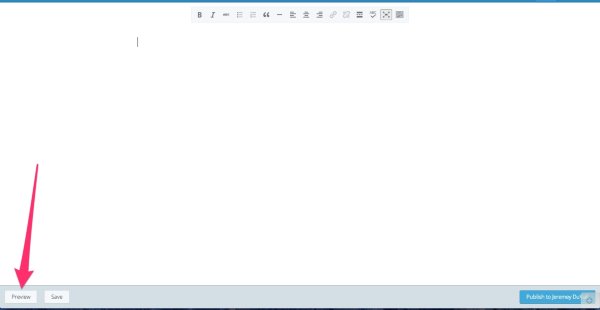
From the classic editor (lifescienceexplore.wordpress.com/wp-admin…), there is not an option to preview directly from that mode.


- The topic ‘Size of hyperlinked text suddenly larger’ is closed to new replies.
 WordPress.com Forums