SIZE of PHOTOS
-
How can I get my pictures bigger ? So big that they fill the gap between the writing. Thank you.
The blog I need help with is: (visible only to logged in users)
-
<a href="http://annettewitte2.files.wordpress.com/2013/11/zwischen-dungarvan-und-cork.jpg"><img class="alignnone size-medium wp-image-7" alt="Zwischen Dungarvan und Cork" src="http://annettewitte2.files.wordpress.com/2013/11/zwischen-dungarvan-und-cork.jpg?w=300&h=240" width="300" height="240" </a>
From the source code on your post, you have chosen to show a medium sized image, with no alignment.
“…<img class=”alignnone size-medium…”
so WordPress.com shows it this size: ?w=300&h=240″ width=”300″ height=”240″Here is info about inserting images on your blog:
http://en.support.wordpress.com/images/#insert-an-image-you-have-already-uploaded
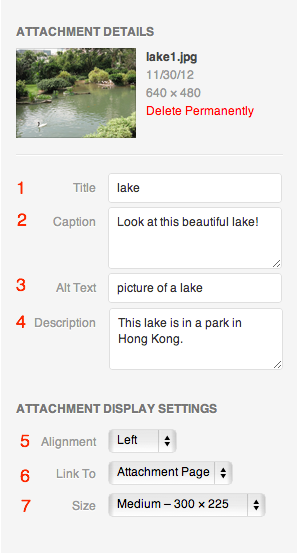
Be sure to look at number 4 and its accomanying picture:
http://en.support.files.wordpress.com/2009/08/image-settings1.png?w=688
Seclect “large” from the drop down menu.Your image is really huge:
1280px × 1024px
Ideally you should upload optimized images to make your page load quickly and to conserve your storage space. -
Personally I’d opt for “full size” when inserting a single image, as the theme will size the image to fill the entire width of the posting column. Makes for less troubles when switching themes too.
@1tess 1280×1024 is not so huge, especially if images are optimized to 72 ppi resolution and saved at a reasonable compression level. I try for that size or even 1600×1200 for the Photo Carousel.
-
For Ryo, the maximum image width is 1272px.
I forgot to add an important note about your image size above:
Your image is 1280px by 1024px and its
file size is 565.2 KB (578764 bytes) which is very large. You should be able to optimize your images to be 100 KB or even smaller and still show large pictures very nicely on your blog. -
@justjennifer,
Yes, we were sort of typing at about the same time. It’s not so much the dimensions of an image that eats up media library storage as it is the file size. If an image is not optimized it wastes space and makes page loads slower. -


- The topic ‘SIZE of PHOTOS’ is closed to new replies.


 WordPress.com Forums