

Sketch theme – questions
-
Is it possible to not have the Featured Post Slider on the Home Page and instead only have a Custom Header? Currently, the Portfolio Archive Page looks exactly how I’d like my Home Page to look.
Can Projects appear in the top Menu or only Pages? I’ve set up content for Books, Speaking etc, as Projects so they will appear on the Home Page. But I’d like them to appear in the top menu too.
Plus when I click through from the Home Page to a Project Page, the Project Page shows the Custom Header image not the Featured image (which appears on the home page). Can this be changed?
Thank you!
The blog I need help with is: (visible only to logged in users)
-
Please consult your detailed theme description page at this link http://theme.wordpress.com/themes/sketch/
I tagged this thread for Themes Staff assistance. Please subscribe to it so you are notified when they respond.
-
You will also probably find that your questions have been asked and answered in other Sketch threads.
-
Thank you for your reply! I have been through the theme description page several times and through all the forum threads on this theme. And the questions I’ve outlined are still questions I can’t work out. I would appreciate help from the Themes Staff. Thanks!
-
You’re welcome. Note there is a backlog so you will have to wait patiently for Staff help. To subscribe:
1. Look in the sidebar of this thread and find the subscribe to topics link.
2. Or look below the comment box for this: _ Notify me of followup posts via e-mail -
Hi there – I’ll answer your questions separately.
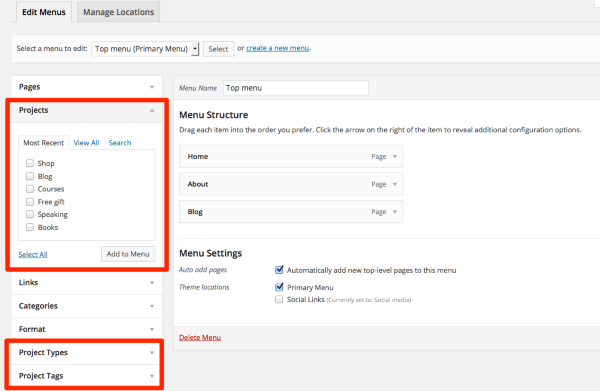
Can Projects appear in the top Menu or only Pages? I’ve set up content for Books, Speaking etc, as Projects so they will appear on the Home Page. But I’d like them to appear in the top menu too.
You can add anything you like to the top menu. Under Appearance > Menus, select your desired projects, project types, or project tags, and add them to the Primary Menu. Here’s a screenshot:
-
Is it possible to not have the Featured Post Slider on the Home Page and instead only have a Custom Header? Currently, the Portfolio Archive Page looks exactly how I’d like my Home Page to look.
Could you try removing the “Featured” tag from the Customizer, and instead letting the Custom Header display? Let me know if that achieves the effect you’re after.
-
Plus when I click through from the Home Page to a Project Page, the Project Page shows the Custom Header image not the Featured image (which appears on the home page). Can this be changed?
The theme was designed to display the custom header at the top of each project, not the project’s featured image. It would be possible to override that by adding some custom CSS for each project, but you’d need the Custom Design feature. If you decide to go that route, feel free to post in the CSS Customization forum and we’ll be glad to help you out with the specific code.
-
Thank you so much for your help! The Featured Post Slider change worked. I’ll look into Custom Design. But the Projects didn’t show up on my Menu like in your screenshot. Not sure why. But I’ve added all the Projects to the top Menu as links – which I think works.
The only issue now is that I created a Project called Blog so I could have it featured on the Home Page. But I also set up a Page called Blog so the blog posts are published there. Under Settings / Reading, I selected Front Page Displays as a Static Page, and then chose the Blog Page as the Posts Page – because it only lets you chose a Page and not a Project. Can I either change where the posts get published? Or change what appears on the front page? Does that make sense? Thanks!
-
But the Projects didn’t show up on my Menu like in your screenshot. Not sure why.
I’m not sure why, either! To open each section in the Menus area you do need to click the little triangle in the right corner. Or is it that you don’t see the Projects bar at all?
But I’ve added all the Projects to the top Menu as links – which I think works.
Sure, that’s a good workaround.
The only issue now is that I created a Project called Blog so I could have it featured on the Home Page. But I also set up a Page called Blog so the blog posts are published there. Under Settings / Reading, I selected Front Page Displays as a Static Page, and then chose the Blog Page as the Posts Page – because it only lets you chose a Page and not a Project. Can I either change where the posts get published? Or change what appears on the front page?
Once you select a static front page and assigned the portfolio template to it, as you have currently, it displays your slideshow with portfolio projects underneath it. It’s not possible to also display blog posts on the front page in addition to the slideshow and portfolio, when it’s set up to use the front page template. Your posts are currently visible on the blog page here: http://jodiebenven.wordpress.com/blog/
Let me know if this answers your question about what appears on the homepage.
-
There’s no Projects listed in the Menu. Only Pages, Links and Categories.
And apologies, my last question didn’t make sense. I don’t want blog posts to appear on the front page. I want the Portfolio Projects to appear as they do.
But I’d like the Blog Portfolio Project featured on the Home Page to link to http://jodiebenven.wordpress.com/blog rather than http://jodiebenven.wordpress.com/portfolio/blog
Or if that’s not possible, I’d like the Page http://jodiebenven.wordpress.com/blog to appear in the slideshow on the Home Page.
Does that make sense? Thanks!
-
But I’d like the Blog Portfolio Project featured on the Home Page to link to http://jodiebenven.wordpress.com/blog rather than http://jodiebenven.wordpress.com/portfolio/blog
Ah, that’s not possible, because the URLs for portfolio projects are automatically generated, and they all have the word “portfolio” in them.
Or if that’s not possible, I’d like the Page http://jodiebenven.wordpress.com/blog to appear in the slideshow on the Home Page.
I’m afraid that’s not possible either, since the slideshow displays single posts only. As a workaround, you could create either a project or post that promotes your blog with a link to it, but that does require an extra click.
If I think of any other workarounds for you, I’ll be sure to post back here!
-


- The topic ‘Sketch theme – questions’ is closed to new replies.
 WordPress.com Forums