

Sketch Theme: Show on project only on slider
-
How can I do in order to show the projects that are on the slider on the front page be shown only on the slider and not be shown again on the rest of the front page?
For now I managed to have them in the last positions when we click ‘previous’
The blog I need help with is: (visible only to logged in users)
-
Could you give these steps a go:
1. Create a Project Tag say, front.
2. Tag the portfolios you want on the front page with front tag.
3. Add the following shortcode to your front page:
[portfolio include_tag=front]front is just an example. It can be anything like abc.
You already set the page template to Portfolio Page Template which is why the slider is appearing. So you just need to use the above shortcode in the content of your front page.
-
And make sure you don’t tag the posts on the slider with the tag you created in step 1 above.
-
I’m not sure chaitanyamsv’s solution addresses your issue – let us know if you’re all set or if you still need help.
Using the shortcode in conjunction with the Portfolio Page template – the only template that includes the slideshow – would result in duplication of projects on the homepage, I think.
One workaround to display a project in the slider but not in the projects area when using the Portfolio template is
to hide the project with custom CSS, but this would need to be manually changed every time you change the projects in the slider, so it’s not a very elegant solution, but the best workaround I can suggest. -
Since I’m using the standard version, there is no CSS available. Unfortunatly it was impossible to try any of the suggestions (at least I, a beginner in this site/blog thing, couldn’t find where to do it).
-
This is not CSS so this works on standard version as well.
Go to your All Pages screen here: https://helenaassediomaltez.wordpress.com/wp-admin/edit.php?post_type=page
Click on Edit link corresponding to your front page. It will be tagged with – Front Page after the name of the page.
You enter the above shortcode in the content area of the front page.
Make sure you tag all the portfolios you want to appear on front page with a tag name like front and use that tag name in the shortcode.
Try these steps and feel free to ask if you have further questions.
-
Chait – the Portfolio template in Sketch (the only template that displays a slider) automatically displays all of a site’s portfolio projects below it. So adding a shortcode with more projects in the editor won’t eliminate the duplication issue, since all projects will always be displayed below the slider, no matter what shortcode is used.
I don’t see a way around this without custom CSS, I’m afraid.
helenaassedio – Your shortcode isn’t working right now because you haven’t assigned any projects the “front” tag, as you can see here – it says 0 next to that tag:
https://helenaassediomaltez.wordpress.com/wp-admin/edit-tags.php?taxonomy=post_tag -
-
Kathtrynwp, now i’ve got 9 projects with ‘front’ tag. The projects are the ones that are in the front page. It would be fantastic if the option ‘previous’ wasn’t there on the left below. this means the shortcode I put on the static front page didn’t work… or that I didn’t do it right, I guess.
-
To display your front page’s portfolio shortcode content, you’ll need to uncheck the box that says “Hide title and content on Portfolio Page Template” in the Customizer’s Theme section:
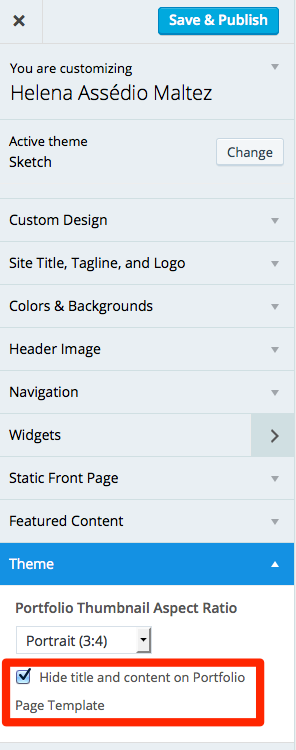
Since you currently have it checked, that content is not displaying.
It would be fantastic if the option ‘previous’ wasn’t there on the left below.
It would be possible to hide the “previous” with custom CSS if you decide to upgrade your site:
.home .nav-links {
  display: none;
}


- The topic ‘Sketch Theme: Show on project only on slider’ is closed to new replies.
 WordPress.com Forums