

Slider problems on Hero Theme
-
Hi guys,
I’m pretty new to WordPress but catching on pretty quickly. I am using the Hero Theme and have tried to use the Featured Content Slider and am being told to do the following:
“Add a tag under Appearance → Customize → Featured Content. Use this tag on posts with a featured image, and they’ll show up in the slider.”
I have done this but still the slider will not work. All the images I am wanting to appear in the slider are all at 960 x 350, per the Hero Theme page. Also, I would like to try and widen my page but I keep getting pointed to the following:
“If you would like to remove the sidebar from a page for a cleaner, full-width look, assign your page the Full Width template under Page Attributes.”
I cannot locate a “Page Attributes” section anywhere so this is becoming pretty frustrating. Any help would be greatly appreciated. The blog is at irishfilmcritic.com
Thank you.
The blog I need help with is: (visible only to logged in users)
-
Hi!
In order to use the featured slider, you’ll need to setup a separate “Front Page”. Currently, your front page is setup to display your latest posts by default. However, the slider requires a separate front page. Instructions for setting it up can be found here:
http://theme.wordpress.com/themes/hero/
Follow the instructions under “Front Page Template”. Can you give that a try?
Regarding the “Page Attributes” function, you should find this on any Edit Page screen (not post) as shown in the screenshot here:
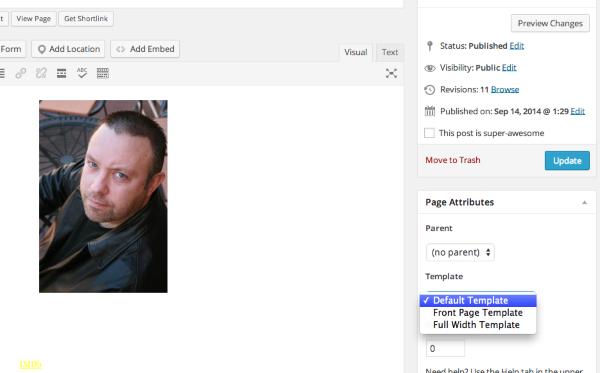
Can you let me know if you’re still having trouble finding it?
-
Hi jeremeylduvall,
And thank you so much for responding. I set up my front page as you stated and was able to add three of my latest posts but for some reason, the slider is still not working. Probably something I overlooked. I went back into the posts, made sure they were all checked with HOME, their corresponding category and FEATURED but still the slider is not working. Any suggestions? Thanks again.
-
I was able to add the three posts to the HOME page by going into Appearance, Customize and under Home Promos, add each title to the three corresponding fields but when I added a new posts after these, it didn’t post to the front page. I used a similar theme on another site and any time I put up a new post, it would automatically upload to the front page and into the slider. SO frustrating at times. :(
-
Hi!
It looks like you added the posts to the Featured category. In order for them to appear in the slider, you’ll need to add the tag “featured”, not the category. The difference between tags and categories is broken down here:
Can you try adding the tag “featured” via the instructions here?
-
Hi jeremeylduvall,
I added the FEATURED tag and it worked wonderfully, they’re now appearing on the front page. I have a question however. If you look at the page now, you’ll notice a blurb about the post in each featured slider pic, how do I get the blurb to go away and just leave the pic? Thank you so much for your help, my site’s looking even better now thanks to your help.
-
-
Wonderful! I’m glad we got the slider up and running. Can you give this CSS code a try to remove the post info?
.featured-posts .post {
display: none;
}
Just input that under Appearance -> Customize -> CSS. Also, just for future reference, we have a forum devoted to CSS customizations here:
https://en.forums.wordpress.com/forum/css-customization
In case you’re interested to learn a bit more, we have some information and resources here:
http://en.support.wordpress.com/custom-design/editing-css/
Let me know if that works for what you’re looking for!
-
Hi again,
That css code worked perfectly and thank you for the link to the css forums, I will definitely check that out. Can I ask a question however? Deleting the blurb kind of leaves the picture naked, so to speak. Initially, the blurb included the heading of the post plus some of the actual review/content, how can I have it to where any featured post/pic will only include the headline? So if it’s a review, it will just be the heading but none of the actual review itself? Thanks again so much jeremeylduvall, your input and assistance has been greatly appreciated.
-
This should do the trick! It will remove the post blurb and the button but leave the post title intact:
#featured-content .entry-content {
display: none;
}
Can you give that a try?
-
jeremeylduvall, thank you so much. My site is finally the way I wanted it to look thanks to your help and input. Thank you so much my friend.
-


- The topic ‘Slider problems on Hero Theme’ is closed to new replies.
 WordPress.com Forums