

social media buttons
-
Why is this box appearing on my front page a
I cannot get to my dashboard to see the widget area
So confused!! -
-
You mean to say social media box? http://prntscr.com/9ylpx7
To remove that use following CSS:
.sharedaddy.sd-sharing-enabled {
    display: none;
}
Can you please clarify if that’s what you looking for?
Thanks.
-
-
@ellejewelers
This thread is not in the CSS forum. Have your purchased a Premium upgrade package or not?I think all you want is this below.
The Admin login link to the dashboard for every blog hosted by wordpress.COM is: http://NAME_OF_BLOG.wordpress.com/wp-admin/
* You will have to replace “name_of_blog” with your actual blog’s name in that URL.
http://ellejewelers.wordpress.com/wp-admin/
To navigate to the widgets page > Dashboard > Appearance > Widgets
http://ellejewelers.wordpress.com/wp-admin/widgets.php
To use the theme customizer see here https://en.support.wordpress.com/customizer/
-
Please consult the detailed theme description page at this link as it has set-up instructions https://wordpress.com/themes/edin/
The live demo site is here https://edindemo.wordpress.com/Social media icons can be displayed on your site in different ways.
For sharing icons below posts and pages see here
https://en.support.wordpress.com/sharing/Add a Social Links Menu – https://en.support.wordpress.com/menus/social-links-menu/
Add Social Media Buttons to Your Sidebar or Footer – https://en.support.wordpress.com/add-social-media-buttons-to-your-sidebar-or-footer/
Social Media Icons Widget – https://en.support.wordpress.com/widgets/social-media-icons-widget/
-
No and I am not planning to at this time, purchasing any custom upgrade stuff.
Dont see where to get that box out and I aadded some social media at the bottom, which I dont even know where to place links for the twitter and facebook.I do not know how this box appeared
-
Timethief , thanks for those links, but I am looking to remove that box that appears on the frontpage
-
Then you require a Premium upgrade purchase and you need to post into the CSS editing forum. This is the support form.
See here for details on purchasing the annually renewable Premium bundle http://store.wordpress.com/plans/premium/ that contains a custom design upgrade required for CSS editing:
Custom design – Frequently Asked Questions
http://en.support.wordpress.com/custom-design/#frequently-asked-questions
http://en.support.wordpress.com/custom-design/
http://en.support.wordpress.com/custom-design/editing-css/
http://en.support.wordpress.com/custom-design/custom-fonts/Note that once you have the required upgrade you can use this link https://en.forums.wordpress.com/forum/css-customization#postform so you can create a thread that will appear in the CSS Forum where you will get the help you need with CSS editing.
You can also post there prior to purchasing an upgrade to get an answer to whether or not what you want to do can be accomplished via CSS editing.
-
I should not have to upgrade and pay to remove something I did not put there on purpose.This is a technical error. I am not a wordpress expert and I just placed this site here for SEO purposes and marketing etc. I will ask over there, but at this point- I am not planning on paying for anything to remove code that should not be there in the first place
-
As you think there is a bug of some sort I will type modlook into the sidebar tags on this thread for Theme Staff help. How do I get a Moderator/Staff reply for my question? https://en.support.wordpress.com/getting-help-in-the-forums/#how-do-i-get-a-moderatorstaff-reply-for-my-question Please subscribe to this thread so you are notified when they respond and be patient while waiting. To subscribe look in the sidebar of this thread, find the subscribe to topics link and click it.
-
You can turn off the sharing and Like buttons on that page in the editor.
In the new editor, open the Sharing panel, and uncheck the same boxes:
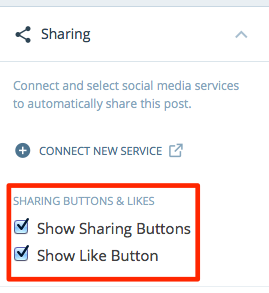
Or in the WP Admin editor, look for this:

Uncheck both those boxes.


- The topic ‘social media buttons’ is closed to new replies.
 WordPress.com Forums