

social media icons
-
I am trying to get social media icons on my sidebar and although i have them on as you can see ~http://blameitontherainbeauty.com/ no pictures are showing up although there are links.
This is the html i used as specified on wordpress to use, I was wondering if you could just add anything it needs to fix it as i dont have any idea about it. Thanks ~
<div><img title=”Twitter” src=”//blameitontherainbeauty.files.wordpress.com/2014/11/twitter_1.png]” alt=”Twitter” width=”35″ height=”35″ /><img title=”Pinterest” src=”//blameitontherainbeauty.files.wordpress.com/2014/11/pinterest2.png]” alt=”Pinterest” width=”35″ height=”35″ /> <img title=”Facebook” src=”//blameitontherainbeauty.files.wordpress.com/2014/11/fb_1.png]” alt=”Facebook” width=”35″ height=”35″ /> <img title=”Email” src=”//blameitontherainbeauty.files.wordpress.com/2014/11/email1.png]” alt=”Email” width=”35″ height=”35″ /><img title=”YouTube” src=”//blameitontherainbeauty.files.wordpress.com/2014/11/you_tube1.png]” alt=”YouTube” width=”35″ height=”35″ /></div>
The blog I need help with is: (visible only to logged in users)
-
At present, I can see all the widgets you’ve specified for your site and they all appear to be functioning correctly:
https://blameitontherainbeauty.wordpress.com/wp-admin/widgets.php
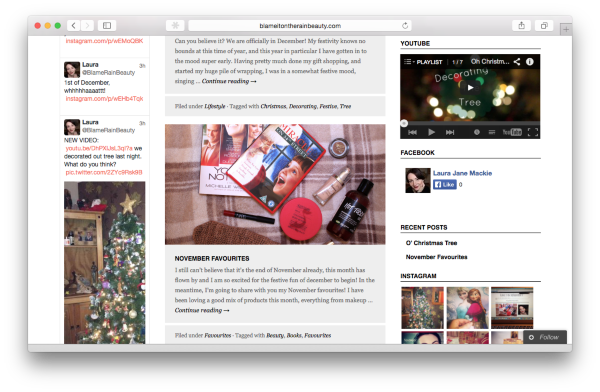
If I’ve misunderstood the issue, or if you have any other questions, please let me know :-)
-
No you haven’t misunderstood, however in all my devices and on other people’s who I have asked to check, none of the social media icons are showing, just white images with a line through them :-/
-
I’ve checked it out on a mobile device, as well, and it still looks fine:
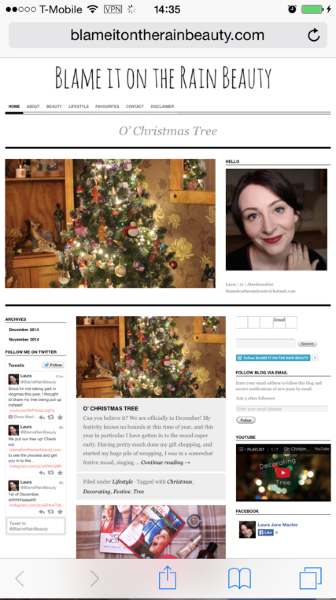
Can you please try clearing out your cache and cookies?
If you are still having a problem, let me know, and we can take the next troubleshooting step, once I get more feedback.
-
From the picture you sent me they arent there either. Its the empty white boxes just under my picture above the join by email widgets, not the twitter and facebook ones which i can see.
-
Now, I see what you mean.
The href and src attributes in the Text Widget’s HTML need to contain valid URLs:
For illustration purposes, I’ve fixed the first button (i.e., Twitter) for you. Simply apply the same changes to the rest of your buttons and you should be good to go.
Let us know if you have any more questions :-)
-
-
Excellent, and you’re welcome.
If you have any other questions regarding WordPress.com, please let us know :-)
-
Hi I actually have one more question about my blog, I currently have the option to follow by email and also the follow by WordPress widget. They both have different numbers next to them and I was just wondering if both numbers in total reflect the subscribers or if people can subscribe to both. I just want to have a clear idea of the subscribers I have.
Thanks
Laura -
There are numerous ways in which visitors can follow your site:
For a clear explanation on how to evaluate your follower stats, please refer to the following support document:
http://en.support.wordpress.com/followers/#follower-stats
Let us know if you have any more questions.
-
For my blog followers under stats it’s coming up 15 for WP and 0 for email, however, on my homepage under the number of people subscriber by email it’s over 30. I just wanted to know which one is accurate?
Thanks
-
That number is a combination of these values:
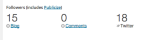
The support page I linked to has the details:
If you have connected any of your social networking services (such as Facebook or Twitter) through our Publicize feature, counts for your followers on those services will also be shown.
Let us know if you have any more questions.
-
Thank you, sorry to be a pain I just have one more question. Is there any way I can link my posts to automatically show up on other pages? Thanks
-
It’s no problem at all :-)
We have Category Pages:
Any time you add a Category to a post, the post will automatically be pulled into the Category Page.
If I’ve misunderstood the issue, or if you have any other questions, please let me know.
-
I understand that part, i was just wondering if there is any way to get the categories as pages at the top of the site, i.e. next to home, contact, etc.
-
I understand.
You just need to configure your menu with the Category Pages you’d like displayed:
https://blameitontherainbeauty.wordpress.com/wp-admin/nav-menus.php
When you’re done, make sure that you save your changes.
Let us know if there is anything else you need.


- The topic ‘social media icons’ is closed to new replies.
 WordPress.com Forums