

Social Media icons not working on Twenty Fourteen page layout?
-
I have tried adding my social media pages to this layout and one works, it gives me the instagram icon; but the other two which are Facebook and pinterest don’t work. Pinterest shows up as to links in a chain, and facebook just doesn’t show at all. I thought I had done them wrong, so I clicked on them (after managing to find the facebook one) and they both brought me to the pages, but the icons are very wrong. Am I doing something wrong, or is this an issue with this layout.
I would like to point out that this is the only layout that I like out of them and I really hope that I won’t have to change, because I might just delete my page all together.
The blog I need help with is: (visible only to logged in users)
-
(because I don’t know how to edit here yey) I know that my blog is private at the moment, and that is because I want everything in place before I make it public. I’m sorry if this hinders any help that is available to me.
-
Hi there – the only icon I’m seeing as a chain link is the third one; Facebook and Instagram are appearing correctly. Is this what you see now?
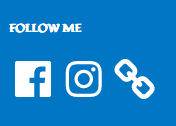
As for Pinterest, try the main .com URL instead of .ca. In other words, use
https://www.pinterest.com/throughyarnandhook/That should fix the issue – let me know how it goes.
-
No, sadly I don’t see that. I do have the main URL for the pinterest and now, while the links have gone, the only thing visible is the Instagram one.
-
Sorry about the other random stuff in it, I usually only use the account for issues online that I can’t directly drag and drop a picture into
-
Sometimes ad-blocker plugins block social icons in your browser. Can you try turning off any ad blockers you might be running, and we’ll take it from there?
-
-
-



- The topic ‘Social Media icons not working on Twenty Fourteen page layout?’ is closed to new replies.
 WordPress.com Forums