Some part of my Custom CSS has suddenly stopped working
-
As the title said, today some part of my css stop working
Title post color, sidebar title color, etc…
Theme : Notepad
The blog I need help with is: (visible only to logged in users)
-
-
me too my theme is Modern news and the nav bar and headings css is not working. It will work while i am in the customize css panel but when i save and exit it goes to default black colour ?
-
-
-
same here. seems to be in the css changes in colors/fonts. tried to fix but it goes back to “default”(?)
what to do?
http://countrywomanpaints.com
chateau theme customized -
Having the exact same issue here with Twenty Twelve theme, everything looks fine in CSS editor but all messy when actually viewing the site. I didn’t change anything.
Nice to see it’s at least something other people are dealing with, too :/ Guess I’ll stop trying to tweak anything looking for an answer.
This is something WordPress.com needs to fix, especially for those of us who are paying for hosting this is just ridiculous.
-
I also am having this issue with my premium Soundcheck theme. Strangely this issue is only affecting the CSS revisions I have made pertaining to background colors and font colors. As others have mentioned, in the CSS editor view, everything looks fine but the actual site, when loaded on a variety of different browsers, doesn’t display correctly.
-
Howdy all,
Thanks for reporting this. It’s happening due to change we made with how Custom Colors and Custom CSS are loaded. To make Custom Colors more consistent they are now loaded after the CSS. Unfortunately, as you’re finding out, this means they can overwrite some of the CSS you were using.
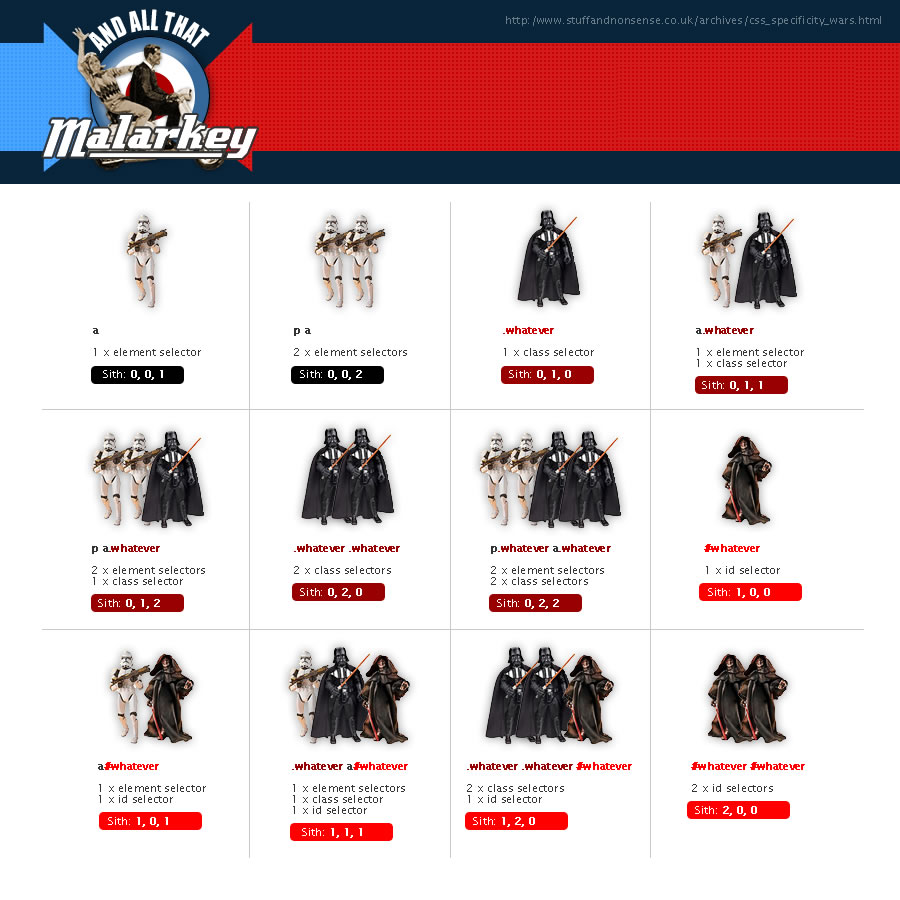
To fix this you will want to use more specific CSS styles. Check out this handy graphic that visualizes how specific CSS styles override each other.
http://stuffandnonsense.co.uk/archives/images/specificitywars-05v2.jpgYou can also add !important to the end of each line of CSS. That would look like this:
h2 a{
text-decoration: none !important;
color: #FFFFFF !important;
}
If you get stuck on anything please feel free to get in touch through our contact form or post the specific style code you need help with here. We’re happy to help sort things out.
Cheers,
Ian -
-
-
-
-
-
-
Follow-up Note: the original change that made the !important necessary for some pre-existing custom CSS rules has been reverted and you should no longer need to add !important to past CSS you had saved to get it to work.
Thanks for the feedback on this!
-


- The topic ‘Some part of my Custom CSS has suddenly stopped working’ is closed to new replies.
 WordPress.com Forums