

Splitting words
-
I apologise for the title but I don’t possess an adequate grasp of english to know how to refer to this practice. I will attempt to elaborate.
Please look at this picture: http://cl.ly/image/1d2Z3t1N2Z2M/2014-01-30%20at%2012.28.png
As you can see, the word “Ljubljano” was split in two automatically (to “Ljubl-jano”). However, I assume because this is not an english word (fwiw, it’s a name of a city), it got split incorrectly with no regard to its syllables.
If at all possible, I wish to turn this feature off. I have some posts in my native tongue on my site and because of that a lot of words get split incorrectly.
Any advice?
The blog I need help with is: (visible only to logged in users)
-
Hi there,
I’m currently looking at your blog post and it is not splitting words as seen below:
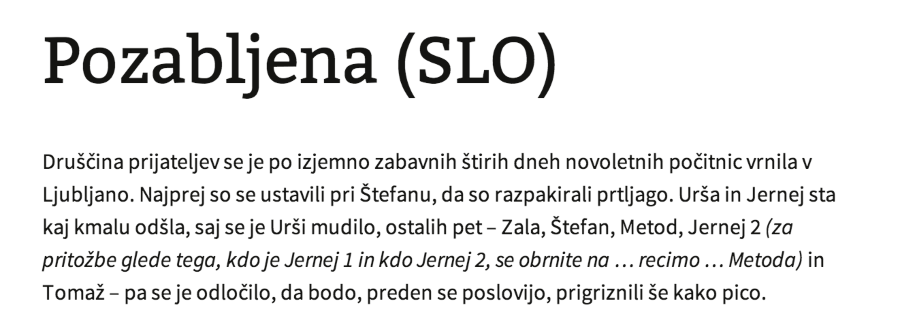
However, just to note words are hyphenated only when a word comes to the end of a line. It means that the word is one word and not two. Just there was not enough space to fit the entire word.
Feel free to reach out if you have any questions!
-
Hyphenation. Thank you. I couldn’t for the life of me recall the word.
It appears “Ljubljana” is hyphenated in this way only in Safari and not in any other browser. Unless I were to resize the windows, than I may be able to replicate it.
In any case, is it possible to turn this feature off? While it does mostly work correctly I still don’t want an algorithm taking liberties with my content.
-
Hi there,
Unfortunately, Safari has been described to support automatic hyphenation. If you want to remove this, you can do this by editing CSS. You would need the Custom Design upgrade to do this. In addition to editing CSS you have access to Custom Fonts/Colors. You can try it out by going to Appearance > Customize in your Dashboard. Go to the custom design tab and click on Try now.
You can add this to the CSS and it will remove the auto-hyphenation:
.entry-content {
	-webkit-hyphens: none;
}
Feel free to reach out if you have any questions!


- The topic ‘Splitting words’ is closed to new replies.


 WordPress.com Forums
