

Spun theme queries
-
Hi, I have a few queries on my site sassandsite.uk which is using the spun theme. I don’t have much knowledge of CSS, so detailed steps would be great. Thanks in advance!
1. I have activated some widgets in my blog but I was the text of the titles to be smaller. I only want to change the size of the font on the widget and not on the whole site.
2. I would also like to change the style of the widget title
3. Is it possible to remove the ‘+’ sign from the comments section on the blog posts?I still want the comments section to appear just not the ‘+’ sign
4. I would also like to change the text on the comments section from ‘Leave a reply’ to ‘Leave a comment’Thanks so much
The blog I need help with is: (visible only to logged in users)
-
Hi there, I’ll answer your questions in a few separate replies.
1. I have activated some widgets in my blog but I was the text of the titles to be smaller. I only want to change the size of the font on the widget and not on the whole site.
Looks like you’ve already accomplished this with:
.wf-active .widget-title {
     font-size: 25px;
}
2. I would also like to change the style of the widget title
What do you mean by “the style”? Looks like they’re using a custom font, are they appearing the way you’d like now?
-
3. Is it possible to remove the ‘+’ sign from the comments section on the blog posts?I still want the comments section to appear just not the ‘+’ sign
You could make the + sign blend in with the comment bubble with this:
.comments-link a { color: #2a6e78; } -
4. I would also like to change the text on the comments section from ‘Leave a reply’ to ‘Leave a comment’
You can change the comment prompt in WP Admin under Settings > Discussion, next to the Prompt box near the bottom:
https://spicensass.wordpress.com/wp-admin/options-discussion.php
-
Hi, just noticed in the last week that a new Facebook logo has appeared towards the end of my page which links to my Facebook site. However the original icon (under social) no longer works even though I have tried to remove and re-add again. The other icons under Social work fine.
I would prefer to remove the new Facebook icon and keep the original so all is in order.
Thanks
-
The logo at bottom right is liking to https://www.facebook.com/Sassandspice.uk/ while the one in the social media widget links to https://www.facebook.com/Sass-and-Spice-920165828058378/
Did you recently activate the Publicize through Facebook feature to your site?
You should be able to deselect the Facebook icon in the Customizer’s Connect panel here, by choosing “Select” and saving your settings.
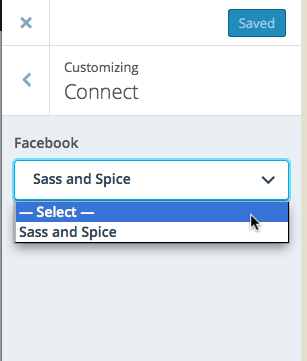
Let me know if this does the trick.


- The topic ‘Spun theme queries’ is closed to new replies.
 WordPress.com Forums