

start fresh with new theme
-
Instead of converting old content to the new theme, how do I start fresh and then move only the content I want to move? I thought just converting it would be attractive, and I did that, but now I think that starting empty and moving pieces in would be easier than dealing with all the old stuff. thanks!
The blog I need help with is: (visible only to logged in users)
-
Hi there,
What you can do is start a new blog and apply the theme you want. Then you can start Exporting what you want from your old blog and Import that into your new blog.
Please take a look at the links for more information. You can start a new blog/site within the same account by going to My Blogs when you log into WordPress.com. Then click on + on the left hand side to create a new blog.
Let me know if you have any questions with this!
-
-
OK, I went in to the account, which I upgraded to premium yesterday so that I could get jeangendreau.com. It lets me create a new blog, but now it wants me to upgrade to premium…. How do I tell it that my acct is already premium and I already have the domain name I want? Thanks!
-
Hi there!
So I see that Premium has been added to the site: northernnarnian.wordpress.com with the domain: jeangendreau.com.
Do you want the Premium upgrade and the domain moved to the site: jeangendreau.wordpress.com? I can do that for you. Please reply to confirm!
Cheers!
-
Oh yes! That would be wonderful. Then what is the easiest way to import from the old northernnarnian to the new? What I will do is move some but not all of the content over. And when someone types in jeangendreu.com, they should arrive only at the new one, right? Should I delete the old one? Thanks so much! Your help has been wonderful.
-
Hi there,
It has been moved as requested! Just a note, since I had to get it transferred I wasn’t able to add the auto-renewal information. If you want to add that, you can add it my going to Store > My Upgrades in your Dashboard.
Then what is the easiest way to import from the old northernnarnian to the new?
The best way would be to Export your site from northernnarnian.wordpress.com by going to Tools > Export in your Dashboard. Then, Import it into jeangendreau.wordpress.com by going to Tools > Import.
What I will do is move some but not all of the content over.
You can do export posts/pages/feedback by date, author, category, or status and import that so you don’t have to export the entire thing at once as seen here:
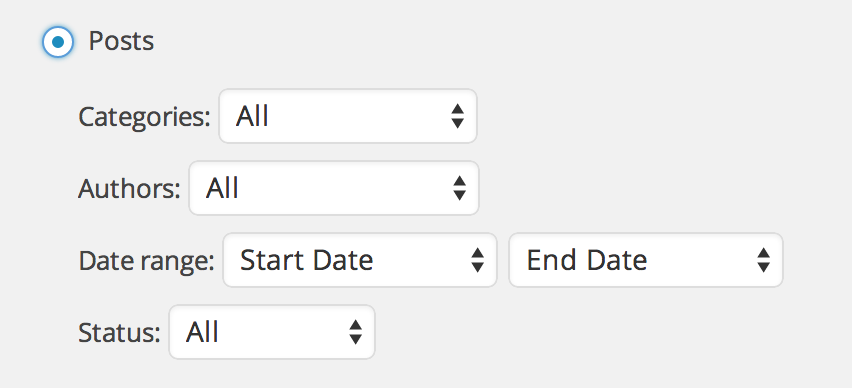
And when someone types in jeangendreu.com, they should arrive only at the new one, right?
Yes, you are correct! You still may see your old site at jeangendreau.com. If you do, please try clearing out your cache and cookies using the guide below:
Should I delete the old one?
This would be up to you. If you don’t want the information out there, you can go to Settings > Reading in that Dashboard and set it to private. This way no one will be able to see the site if they go to it. I usually find it a bit safer than permanently deleting the site as you would not have access to it at all and you’d lose the site address as well. I’d leave at least until you are able to export/import what you want. Please note that the images and media in your Media > Library page will not export/import over.
Feel free to reach out if you have any questions!


- The topic ‘start fresh with new theme’ is closed to new replies.
 WordPress.com Forums