

static homepage settings
-
1.I want to have a static front page or “home” page. I don’t the word Home to display within the content of that page. But if I don’t title the page, then “home” doesn’t show up on the main navigation menu
2. I don’t want comments or rate this on the home page. it makes it look like a blog not a real websiteThe blog I need help with is: (visible only to logged in users)
-
Hi there,
1.I want to have a static front page or “home” page. I don’t the word Home to display within the content of that page. But if I don’t title the page, then “home” doesn’t show up on the main navigation menu
What you can do is create this Home page, and then just remove the word Home on the page by editing the CSS. This will have Home show up on the Menu but not on the page.
Once you create the page, and add it let me know and I can help you with the code to remove it on the page.
2. I don’t want comments or rate this on the home page. it makes it look like a blog not a real website
Once the page is created, scroll down and you will see the Discussion module. Then you can disable comments and likes. It will look like this:
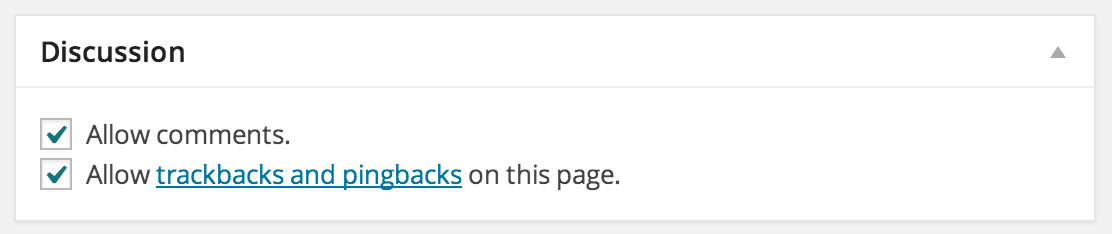
Feel free to reach out if you have any questions!
-
Thanks Grace, I have created the Home page.
When I scroll down I don’t see the Discussion module
-
oops found the discussion module thanks!
okay ready for some css to get rid of the word home :)
-
Hi there,
Sounds great! Since you want to create a Static front page, you will also need to create a Posts page (a page to place all your posts). I have created a draft page for you. You can keep the title, or rename it to whatever you want, for example, Blog, is something I’ve seen too.
Then, please publish both the Home and the Posts page. Then, go to Appearance > Menus in your Dashboard and add those pages to your menu. You can arrange them in whichever order you want.
Then, go to Settings > Reading in your Dashboard and set the Home page as the static front page, and the Posts page as your Posts page.
Make sure to save all your changes. Then, go to Appearance > Customize in your Dashboard and add this to the CSS:
.post-3981 .entry-header .entry-title {
	display: none;
}
This will remove the title Home from your Home page, but leave it in the menu!
Please let me know if you have any questions!
-
-
2 more questions:
1.how do I get rid of the “rate this” and 5 stars from the homepage?
2. how do I get rid of the text “blog at wordpress.com” from the footer?
-
1.how do I get rid of the “rate this” and 5 stars from the homepage?
You can disable this by going to Settings > Ratings in your Dashboard. You can get rid of it on your Posts and Pages.
2. how do I get rid of the text “blog at wordpress.com” from the footer?
All WordPress.com bloggers are required to maintain the credit links, even our VIP bloggers. Please do not hide or alter text or links for the footer credits or the toolbar. Modifying the style of the footer text (i.e. colors and font size) is fine as long as it’s still readable.
-
can I change the text to “Hosted by WordPress.com” instead of “Blog at WordPress.com”
I want this to resemble a website as much as possible and the wording in the footer suggests that its just a blog
-
Unfortunately, that would be breaching our Terms of Service. I’ve asked around and while there are no immediate plans to change the wording, there has been some testing with different text in the footer and the results in addition to user feedback will be considered if we make a change. For now, there is not a way to change “Blog” to something else.
I’m sorry I couldn’t be of more help.
-
Sorry to keep asking, but I notice other blogs on wordpress that read “Proudly powered by WordPress” Instead of “blog at wordpress”
-
Please note that is a self-hosted WordPress.org blog. To clear up any confusion, WordPress.com and WordPress.org are two different entities. At WordPress.com, we provide hosting, support, and tons of features for blogs. Users also have the option to purchase a variety of upgrades to customize the look and feel of their blog. WordPress.org is a software for self-hosted sites. With WordPress.org, users are provided access to all backend files and can upload custom themes and plugins.
Check here to learn more about the difference between WordPress.com and WordPress.org:
Let me know if you have any questions about that.


- The topic ‘static homepage settings’ is closed to new replies.
 WordPress.com Forums