Static Page Problems
-
I followed the directions in the FAQs to make a status page, but when I get to “Go to Options>Reading”, the options that are available to me are not the same as the ones on the FAQ sheet. Nothing says anything about making the home page a static page. How can I make the home page static?
-
i see it no problem. go to dashboard, select options, under it select reading. it’s right there on the screen once loaded, you don’t even have to scroll down. just a thought: you do have a page set up already, right?
edit: do you mean making your home page the front page? then you must click on the ‘your latest posts’ option. all your latest posts go to home page. static page is for bloggers who want a page to be their front page instead of the home page.
-
The problem was actually the template I was trying to use. That particular one doesn’t allow static front pages.
But thanks for your help!
-
Why do I get the feeling that the poster is using wp 2.0 and not hosted here?
If this is correct, you’re running different software and need to be over at http://wordpress.org/support
Theme support shouldn’t come into play as Static front pages are generated from the wordpress code and wrapped around the basic page template.
-
-
-
-
-
-> Dashboard -> Writing -> Reading Options
Front Page
Front page displays:
Your latest posts or
A static page (select below)
* Front page:
* Posts page:
To save click Update Options after you have made your selection.The other alternative you have is to change the timestamp on the page. However neither making a static front page nor changing the timestamp to always keep a particular post on top are good ideas from a google juice point of view.
-
why in the
*post page:
my last post that I want to make it static doesnt display in the list?
thanks “timethief” for your kindness.
^_^ -
-
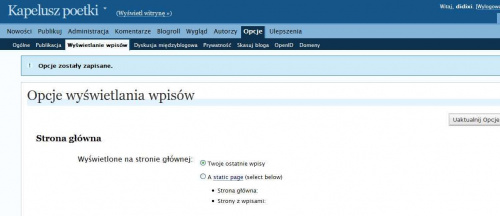
I save a static page option and there isn’t any action fron server: http://images6.fotosik.pl/5/1e2e42e066bda96fmed.jpg
No static page saved, no way to choose the page (Strona główna for example) though I’ve got one already prepared.
Any idea how I can get “book-like” blog? I do need one.
-
I save a static page option and there isn’t any action fron server: http://www.fotosik.pl/pokaz_obrazek/pelny/15e98278e724c9bd.html
No static page saved, no way to choose the page (Strona główna for example) though I’ve got one already prepared.
Any idea how I can get “book-like” blog? I do need one.
Sorry for doubling the post.
-
If you need a book-like blog, go to the FAQ and search for “Book”. There are instructions there on how to write a book in WordPress. As for the static page issue, have you cleared your browser cache and done a forced reload of your blog? It could be that when you go to your blog URL (what is it, by the way?) you’re looking at a cached version rather than the current one.
-
I’ve done it. It sais I should choose a static page and main page, and index page. The problem is, that choosing any of these is imposible – no such option! Vide my earlier post. I can’t choose! No radio button! And the choosing an option “s$tatic page” doesn’t result in any changes (I tried to show the result on screen shot). One of my pages: http://europejka.wordpress.com/ I washed up the cache, it doesn’t help.
-
Well, is there anybody to help me? I still can’t make my choosen page a static one – there isn’t any way to choose it! Really, I mean it! Just take a luuk at this: http://www.fotosik.pl/pokaz_obrazek/pelny/15e98278e724c9bd.html
This screen shows what I see after saving a static page option! It just turns back to normal state, without saving. Any way, there isnt any way to choose Index page (spis treści) or Main page (Strona główna).
I don’t like not knowing what is going on… Sorry guys for bothering you wit this questions. I’ll be happy if you solve this one for me!
-
I think the solution is what we’ve already seen, farther up the thread: your theme may not allow this option. Try changing to a different theme and see if that fixes it. Or did you try that already?
-
-
Then if I were you I’d send a Feedback to support. If you’re using Safari, though, you might want to try a different browser; it has some serious issues with WordPress and sometimes interferes in the strangest way.


- The topic ‘Static Page Problems’ is closed to new replies.
 WordPress.com Forums