

Stay Theme
-
Hi guys,
I am trying to make my site look exactly like the Stay theme. But I am not able to put the menu that you see at the left primary side bar for Rooms, King Suite, Queen Suite, Amenities, Testimonials. There are only two Menu locations so how did they appear at the left primary side bar as a menu. Please help. Thank you.
For comparison, my blog site is http://www.thegrandhotelsmyanmar.wordpress.comThe blog I need help with is: (visible only to logged in users)
-
The Stay theme seems to be a difficult theme for a lot of bloggers to comprehend the workings of. Here’s a link to the detailed theme description:
http://theme.wordpress.com/themes/stay/
Scroll down to “Home Page Template”
See also Live demo site here http://staydemo.wordpress.com/You will need to follow the instructions to make the theme to look like the one in the demo. The demo is using the “Home page template” which cycles through select top level pages on your site. Create a page called for example “Home” and then set that page as the static front page for your site and create another page fro example “blog” for your posts to appear on.
The front page of the blog by default will display your posts (not pages) in reverse chronological order, with the most recently published post on top. If you do not want all the posts to show on the front page, then you can create a static front page. To do that create two pages > http://en.support.wordpress.com/pages/ After you do that you go to > Settings > Reading and make the designation change and click “save changes”.
http://en.support.wordpress.com/pages/front-page/Note: The theme has a featured page slider and image size is at least 960 wide. Ideal width for the slider is 1200px.
-
Hi timethief,
I followed all the instructions I needed to. But still, somehow, I can’t make my pages appear on the left primary side bar just like the demo. Those pages I mentioned are on the left primary side by in the demo (expect at home page). Please go to about page of both demo and my site and you will know what I mean. Thanks. -
I don’t do any of this theme set up stuff on my text blog for other bloggers any more. What I will do is I tag this thread for Themes Staff assistance. Please subscribe to it so you are notified when they respond. Note there is a backlog so you will have to wait patiently for Staff help.To subscribe:
1. Look in the sidebar of this thread and find the subscribe to topics link.
2. Or look below the comment box for this: _ Notify me of followup posts via e-mail -
Thank you Timethief. I will wait. It is not that important but I just can’t let it go at the moment. Thank you for your help.
-
-
The menu you’re seeing on the demo site is a Custom Menu:

Instead of being displayed in one of the theme’s menu locations, it’s displayed by placing a Custom Menu widget in the Primary Sidebar:
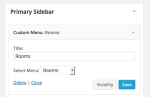
If you need further help, just let me know!


- The topic ‘Stay Theme’ is closed to new replies.
 WordPress.com Forums