

Sticky post with no author or date tag
-
Hi – I want to add a sticky post to my front page with the author and date removed. How do I do this? Thanks!
The blog I need help with is: (visible only to logged in users)
-
Hi there!
Sure! You can remove the date of only sticky posts by adding this to your CSS:
.sticky .entry-date {
	display: none;
}
Feel free to reach out if you have any questions!
-
Any reason this wouldn’t work in the preview? I have my post ready, but the author and date are still showing up in preview mode, even though I’ve edited my CSS as you suggested. Thanks!
-
Hi there,
It’s because you haven’t created a sticky post yet. Please view the link which will provide you specific instructions on how to create them!
Cheers!
-
-
Hi there,
So you can, but please remove the first CSS code that I provided you and add this:
.sticky div.entry-details, .sticky footer.entry-meta {
	display: none;
}
So currently you have no sticky posts so when you actually create the post when you click into the post, the date, share buttons etc will show up. After you create the post let me know and I can get the post ID of that post and provide you the code to remove all of that.
However, if you want to try for yourself you can find the post id by going into the actual post itself once it’s created. Then right click anywhere on that page and go to Inspect Element. When you do that you can find the post ID as seen here:
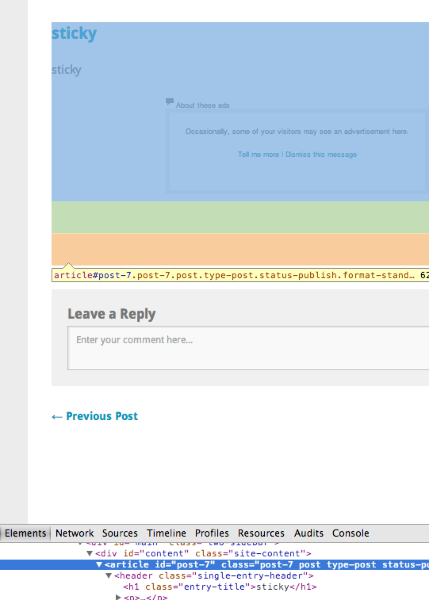
You will see the ID number after <article id=”post-7″ <- so 7 is the post ID. Please note that this will differ for each post, so you need to find the post ID of your sticky post. So put your ID number in place of the three XX’s below:
#post-XX header.single-entry-header p, #post-XX #jp-post-flair, #post-XX footer.entry-meta {
	display: none;
}
If you run into any issues, let me know and I can help you with this!
-
Hi – I’ve posted my first sticky post! I made a quick attempt at finding the post ID, but have been unsuccessful. Would love a bit more of your help. Many thanks!
Lauren -
-
Okay – one more thing! How do I remove the author date from ALL of my posts? I am the only one who posts, so I don’t need the tag. Thanks for all of your help!
-
You can remove it by adding this to your CSS:
header time.entry-date, header span.byline { display: none; } time.entry-date { display: none; } -
Thanks for all of your help. I am noticing additional changes that I would like to make as I go. Can I remove the “leave a comment” tag on all of my posts? I would also like to take out the grey box at the bottom of each post that says “author: laurenezellyoga” and includes my bio. I have this information elsewhere on my website and don’t need it here. Thanks!
-
To hide the Leave a Comment link we can first hide the date and Comment link, and then use a pseudo-class rule to bring the date back.
.entry-details p a { display: none; } .entry-details p a:first-child { display: block; } -
To hide the author info below posts on single post pages, add the following CSS.
.author-info { display: none; } -
I’m trying to remove the author and date on my sticky note… where do I put this code in the css.php? my website is http://www.vedabirth.com
I’m using the theme twenty twelve, I had to reinstall it because I messed up the code trying to do this. I’d also like to have all font in black, right now my blog post heading is in blue. Thank you for the help! -
Hi @vedabirth, it looks like you are using WordPress but you are not hosted here at WordPress.com. For self-hosted WordPress sites such as yours, there is a Twenty Twelve Theme Support forum at WordPress.org where you can post your questions.
For general questions on self-hosted WordPress.org installations, visit http://wordpress.org/support/.


- The topic ‘Sticky post with no author or date tag’ is closed to new replies.
 WordPress.com Forums