Strange background
-
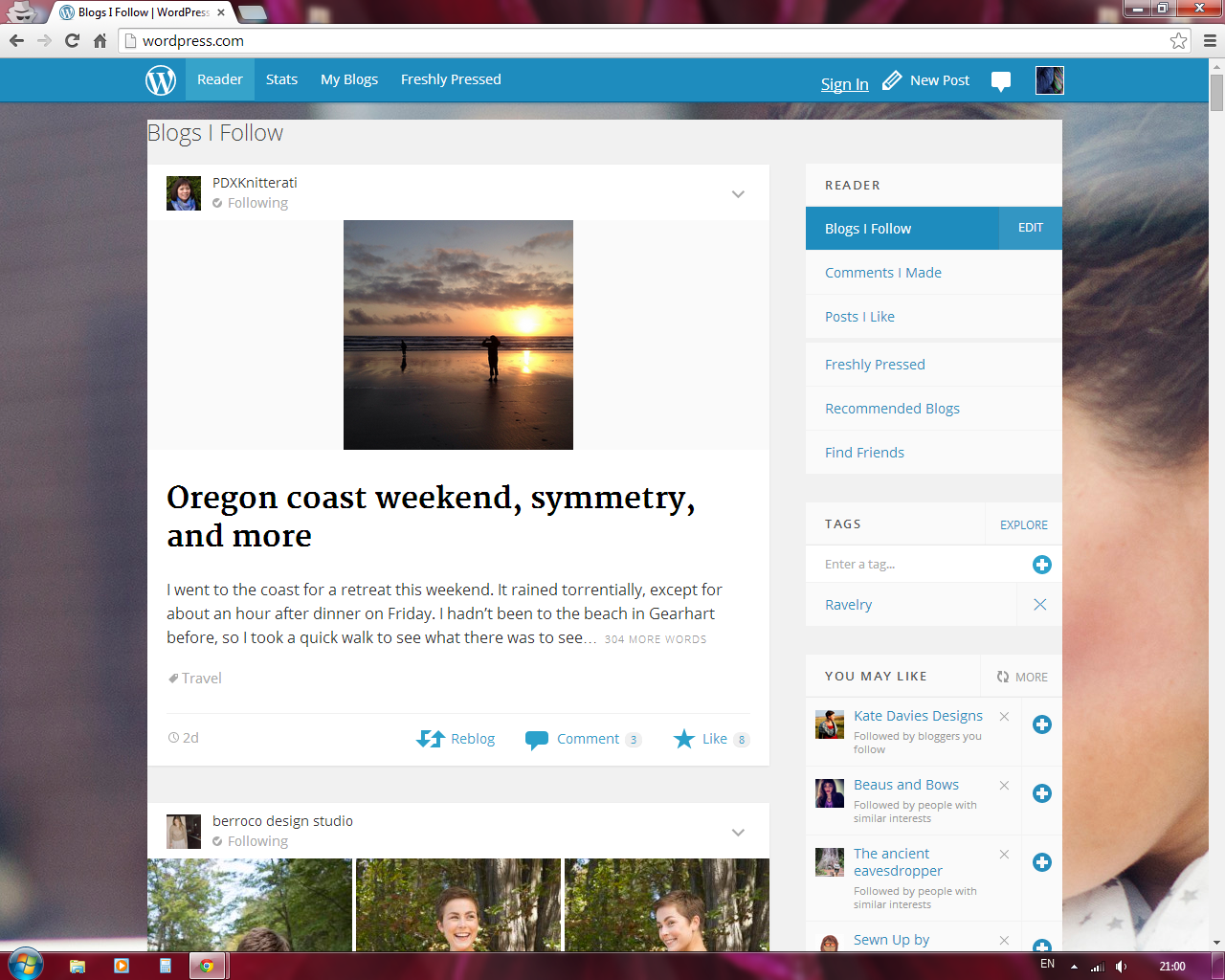
There’s a strange background on my news feed, stats and blogs. What’s going on?
I go to my site and there’s a picture of someone drinking coffee as background to my reader, stats and blogs when I select my blogs. I didn’t set it up that way. Am I being hacked?
I repeat, what’s going on?
The blog I need help with is: (visible only to logged in users)
-
Can you show me a screenshot of what you are seeing?
Here are some screenshot instructions if you are not familiar with the process:
I find http://snag.gy/ to be very useful for sharing screenshots. You can also upload the screenshot to your site’s media library. I will be able to see it there.
-
-
It sounds like clearing your cache and/or cookies should solve the issue. I would try cache first.
-
-
Clearing cookies and cache took a couple of tries, but it worked. At one point there was a strange b&w background picture.
I also wonder what’s going on?
-
Same here, logged in with a different account. (screenshot)
Haven’t logged in with that account for a few days, if not weeks, so caching is not a problem here as I clear every time I close Chrome.
-
Additionally, please note the extra “sign in” link in the blue admin bar, but I’ve already signed in.
-
In general, the design team is just working on the sign in page. But the image shouldn’t be following you. So that part obviously still needs a little work.
-
The background is part of a test to try out a new design for 24 hours. After it’s over, the designers will review again and decide whether to keep it.
Additionally, please note the extra “sign in” link in the blue admin bar, but I’ve already signed in.
This sounds like a bug in the design test. I reported it, but I’m not sure it can be fixed for the test this time around (and it should be over soon anyway). But it’s certainly something we’ll need to watch out for if the results are positive and changes are made based on that. Thanks for the screenshot justjennifer!


- The topic ‘Strange background’ is closed to new replies.
 WordPress.com Forums