

Sub-menu hidden behind slideshow
-
My sub-menu is hidden behind the slideshow. I’m sure it’s a z-index issue but I cant seem to find the right class or ID to change.
I’ve played around in firebug and nothing seems to work. Any ideas?
The theme is: Confit
The page URL is: http://rosemaryjason.wordpress.com/whats-a-hungry-nomad-map/.Thanks in advance.
The blog I need help with is: (visible only to logged in users)
-
Hi there,
So, the reason why the z-index issue is not working out is that you added HTML to your slideshow:
<p style="width: 100%; height: 460px; margin-top: -475px; color: #ffffff; background-color: #ffffff; border: 1px solid #FFFFFF; position: relative; z-index: 1;">-</p>I’m assuming you added this to make the border of your slideshow white. However, you can do this with CSS. Please edit your About page and remove that. Then go to Appearance > Customize > CSS in your Dashboard.
Once you are there locate this:
#content .slideshow-window, .jetpack-slideshow {
	background-color: #ffffff;
	z-index: 1.5;
}
Can you please edit it to look like this:
#content .slideshow-window, .jetpack-slideshow {
	background-color: #ffffff;
	z-index: 1;
	border: 20px solid #ffffff;
}
That should make your slideshow border white and move the sub menu in front of the slideshow. It should end up looking like this:
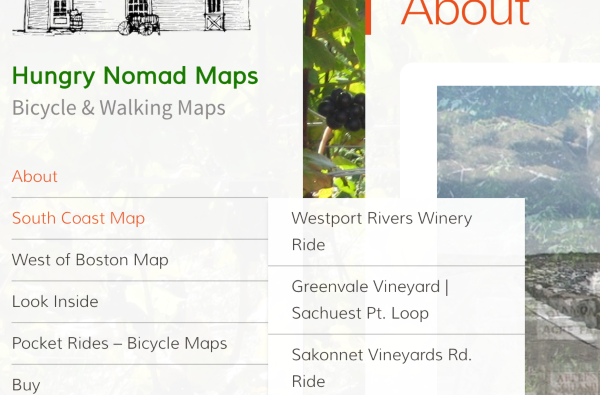
Feel free to reach out if you have any questions!
-
-


- The topic ‘Sub-menu hidden behind slideshow’ is closed to new replies.
 WordPress.com Forums