

Subcategories not shown or deleted.
-
hello all,
I have tried in both current and legacy panels. Sub categories not shown and in current editor are partially shown but they are not editable as renamed or deleted. I have to edit main category to show sub categories.
After that, while choosing “show posts” e.g. shown “3” included in sub category return nothing. That is correct as long as there are not any posts under this sub category although it counts e.g. 3 items. Further more, trying to delete or even rename the sub category freezes the page.
Any help please?
The blog I need help with is: (visible only to logged in users)
-
Hi,
I have tried in both current and legacy panels.
The site https://geopap7.wordpress.com/ has the Rowling theme applied. It’s not a panels theme. What panels? Are you referring to a different site?
Subcategories not shown or deleted
Do you mean that subcategories are not shown in aCategories Widget? If not, then where are they not showing?
If you have created post subcategories on the site https://geopap7.wordpress.com, and they are not displaying in the categories widget in the sidebar widget area, then the most likely cause is that those subcategories have not yet been assigned to any published posts.
-
Hello musicdog1, thank you for replying!
by panels I meant blog’s control panel, guess this was a wrong word for “My site –> Setting –> Writing–> Categories” options “panel”.
So while in the “…–>Writing–>Categories” options I can only see the main categories, but no subcategories in the list. Specifically in “Stock Footage” category I have previously added three subcategories that now I do not use. One of them was named “Green Screen”.
I forgot about those sub categories, and while trying to make a new “Green Screen” top category, I got a message “Category exists”. That of course was right. Here starts the problem:
I have to edit main category named “Stock footage” and select/deselect “top” option and update to just see the subcategories under. Then while I try to edit (rename) or delete the subcategories, page just stuck. Nothing applies to those subcategories. They also show a (false) number of posts under them.
I am sorry if I didn’t make it clear enough, my English are not the best,
if needed I can provide more info or screenshots?Thank you.
-
Hi there,
All 16 categories on your site are top-level categories and I don’t see any subcategories. Are you editing them through the Categories & Tags module on the post or through the site settings (https://wordpress.com/settings/writing/)?
-
Hello @fstat, also thank you for replying!
You are correct I have created most of categories and those subcategories while making posts through Categories & Tags module on the post.
But I have tried to edit them in the site settings (https://wordpress.com/settings/writing/) also through (I think is called legacy editor?) at https://geopap7.wordpress.com/wp-admin/edit-tags.php?taxonomy=category
but with the same result: page freezes when I try to save an edit or delete action on those three subcategories.
Thank you.
-
Specifically in “Stock Footage” category I have previously added three subcategories that now I do not use. One of them was named “Green Screen”.
I see no category on your site with that name, and no subcategories under the Stock Footage category at all. Here are all the categories I see on your site:
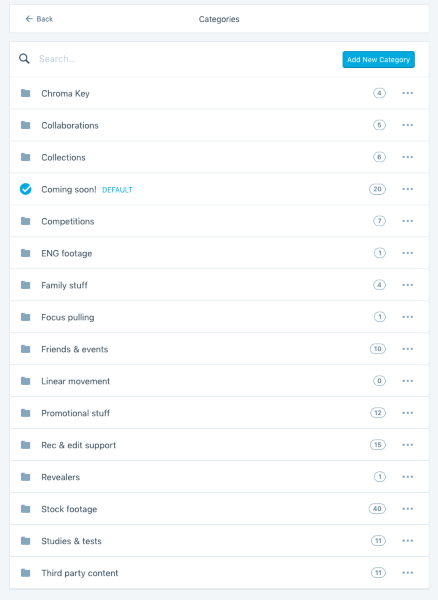
If you see subcategories there, those might be cached in your browser. Please try clearing your browser cache, or check if you still see them if you log in using a different browser or incognito mode.


- The topic ‘Subcategories not shown or deleted.’ is closed to new replies.
 WordPress.com Forums