

subfolders for photographs on a page set up like a website
-
I’m attempting to create an artist website using Designfolio template. I’m uploading photographs to a page titled “portfolio” and wonder if it’s possible to create linked subfolders by year such that under the “portfolio” header there would be folders for “2009,” “2010,” “2011,” etc. Thanks.
The blog I need help with is: (visible only to logged in users)
-
Would you like to have a menu item, “Portfolio,” that when clicked, would display a drop-drown menu for separate years? If so, yes, this is possible.
In order to guide you through this, I’ll need you to decide if your links will go to posts with images attached, or to photo gallery pages.
If you decide on the photo gallery pages (click for instructions), please go ahead and create those pages called 2009, 2010, etc. We can add them to the menu when you’re done.
Let me know exactly what you’re hoping to accomplish and I can help you further!
-
robyn,
the initial issue has been resolved. thank you for your help. this is a tangential issue but the thing that attracted me to the designfolio software is the widescreen image displayed on the splash page for website looks. how can i get this look? thanks.
ct
-
Ah! Lovely theme :)
In order to create the full-screen width slider, please check out Designfolio’s support document that outlines the process:
https://wordpress.com/themes/designfolio/support/
You’ll refer to the first section on the page — Setting Up the Homepage Slider.
Let me know if you have other questions. Cheers! -
hey once again. i followed the instructions for creating + uploading a full frame, wide screen image but was unsuccessful. any other suggestions will be appreciated. thanks again!
ct
-
Hello there! I noticed that you switched your theme to Gridiculous Pro. If you’re pleased with that choice, please let me know. Otherwise, I’m happy to assist you in adjusting your settings on Designfolio. Thanks much!
-
thanks again for the support robyn! yeah, i think i’m getting more of what i want with gridiculous. however, i’ve noticed that i can’t set up a “blog” menu page like i had with designfolio. also, i lost the ability to have people follow me on the various social media platforms like facebook, instagram, pinterest, etc. if you’re able to assist me with that in gridiculous, that’d be awesome!
thanks again.
ct
-
Hi! Yes, when you switch between themes, you retain all your content, but you lose all those design adjustments and settings!
You can add a menu item called Blog on Gridiculous…however…your front page is already set up to show your blog, so it would be redundant. If you created a static front page that didn’t display any posts (like Designfolio’s demo), then you would need that tab.
i lost the ability to have people follow me on the various social media platforms like facebook, instagram, pinterest, etc. if you’re able to assist me with that in gridiculous, that’d be awesome!
I see those empty social media buttons in the footer of your page, so you’ll just need to repopulate those. To create a social menu, please do the following:
Go to Appearance → Menus and create a new menu. Use the Link panel on the left to add any of the following social sites:
Twitter
Facebook
Pinterest
Google+
Dribbble
Github
Tumblr
YouTube
Flickr
Vimeo
Instagram
LinkedIn
Bitbucket
Once you’ve added the social sites you want with a link to each profile – like https://twitter.com/wordpressdotcom – check the Social box at the bottom of the menu and click Save Menu.Your social links will now be displayed in the site footer.
Because I was able to find your Twitter profile through Google, I created that button for you, to start you off. You can see that in the Social menu I created in Appearance → Menus.
I hope this is helpful. Please let me know!
-
hmmm. for some reason this one didn’t work. i see in the “menu settings” i have the choices for theme locations “primary menu” and “social (currently set to: social).” however, i don’t see the “social” tab on my menu bar (and subsequently haven’t tried to add anything to it).
thanks again!
-
Hi again! You can select which menu you want to edit right under the Edit Menu tab, as seen here:
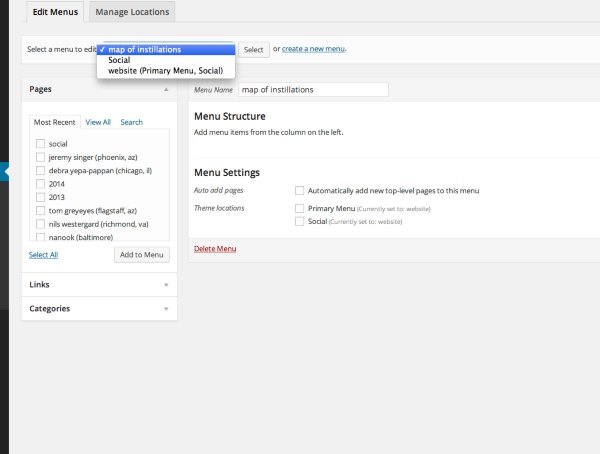
All the best!


- The topic ‘subfolders for photographs on a page set up like a website’ is closed to new replies.


 WordPress.com Forums