

supress the grey frame on diaporama on Twenty Seventeen template
-
Hello everybody,
Does someone know how to delete the frame on slideshow mode?
I’d like it to be without anything just like when I’m adding a single pic.Thank you very much,
JulienThe blog I need help with is: (visible only to logged in users)
-
Hi Julien,
Thanks for posting. It is possible to remove the frame and the background around the slideshow using Custom CSS, which is available with the the Premium and Business Plan.
If you are already subscribed to either of the plans –– you can use the below CSS snippet in the editing CSS section of your Customizer.
Here is the code:
.slideshow-window {
    background-color: inherit;
    border: 0px;

}
Hope this helps, let me know how it goes, would be happy to assist you further.
Thanks!
-
Thank you so much for your help.
I copied and pasted your code in the proper area but it doesn’t seem to work.
inherit is in red but still, when I just change for an exa code and it becomes blue, doesn’t work.
Have you got an idea about why?
Thanks again,
J -
Hi again,
Just try to use these code options.
1)Making the background transparent and remove the border:
.slideshow-window {
    background-color: transparent;
    border: none;
}
2)Making the background transparent and remove the border and giving priority:
.slideshow-window {
    background-color: transparent !important;
    border: none !important;
}
Let me know how it goes.
Thanks!
-
Thanks for helping out, pavanraheja.
Julien – Since your site has the Premium plan, you’re also entitled to live-chat and email support, accessible here:
https://wordpress.com/help/contact
You’re welcome to still post in these forums, but those other support avenues may be faster, and you’ll always get a staff reply, while the forums are a mix of staff and volunteers, and staff doesn’t answer every question.
-
Hy everybody !
Thanks again for helping.
@pavanraheja, I am using the second one and it works.Now I still have another detail : I have big round corners. How can I supress them to look like single pic?
Best,
J -
Hello J,
Try this code –– I just removed the radius out from the borders to make them square like your other images.
.slideshow-window, .slideshow-window * {

    border-radius: 0;
}
Hope this helps.
Thanks!
@kathrynwp: As always, most welcome! :)
-
Hello P,
Thanks!
it seems to work sometimes on some pics of the slideshow but not all.
Weird. -
Hi J,
I tried the code on my test screen. It seems to work fine, all the slideshow round corners are gone. Could you share a screenshot of the pics where they are still rounded after you apply the code?
Also, note as @kathrynwp informed you have a quick Live Chat support option too.
Let me know further, would be happy to assist you ahead.
Thanks!
-
Hi,
You can see the result here :
https://owaspeaker.com/Thanks.
PS : I tried to chat without success
-
Hi again,
Try the code snippets below, hope they do the trick. This is how it appears on my screen:
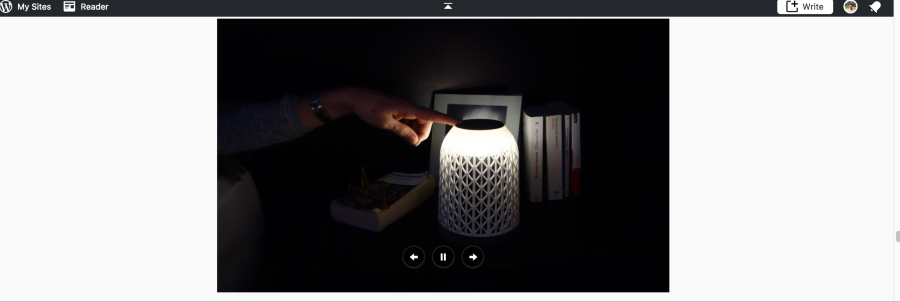
1)
.slideshow-window, .slideshow-window * {

    border-radius: 0 !important;
}
2)
`
.slideshow-window {border-radius: 0 !important;
}Let me know how it goes.
Thanks!
-
Hi again,
Try the code snippets below, hope they do the trick. This is how it appears on my screen:
1)
.slideshow-window, .slideshow-window * {
border-radius: 0 !important;
}
2).slideshow-window { border-radius: 0 !important; }Let me know how it goes.
Thanks!
-
Hi again,
Try the code snippets below, hope they do the trick. This is how it appears on my screen:
1)
.slideshow-window, .slideshow-window * { border-radius: 0 !important; }2)
.slideshow-window {

border-radius: 0 !important;
}
Let me know how it goes.
Thanks!
PS: Apologies for the errors!
-
-
Am glad it worked! :)
Please let me know if I can assist you any further.
Best Wishes! :)


- The topic ‘supress the grey frame on diaporama on Twenty Seventeen template’ is closed to new replies.
 WordPress.com Forums