

Table in text messes up sidebar
-
I use Sela theme with custom upgrade. It is working great and I am very pleased with it. But on one page (https://theway21stcentury.wordpress.com/bible/the-fulfilment-of-old-testament-prophecy/) I have entered a simple 2 column table, and that has pushed the sidebar down to the bottom and messed up the bottom widget areas.
I have reduced the width of the table, put a
clear:noneinstruction in the table css and tried a few other things, but I can’t identify why the table is doing this. But if I remove the table the sidebar reverts to the correct position.Does anyone have any suggestions as to why this is occurring please?
The blog I need help with is: (visible only to logged in users)
-
I copied and pasted the table from that page into a test page and published it without any adverse result, and in particular no displacement of sidebar widgets. I don’t think the issue lies within the table itself. Perhaps there is a stray div tag or other stray HTML code in the vicinity of the table. See the HTML Troubleshooting support page.
-
I will look again, but I removed the table and the page appeared correctly. I then re-inserted the table but removed all the contents, so all that was left were the
<table><tbody></tbody></table>tags, and the problem appeared. So it appears to me to be something in those two tags.I noted that in the CSS (not my CSS but the Sela theme) the tbody tag has this style:
display: table-row-group;, which I haven’t seen before and I don’t know if it has any effect. But I tried to overwrite it in the CSS withdisplay:initialbut that didn’t work either.Do you know anything about display: table-row-group?
-
Do you know anything about display: table-row-group?
No. I’ll tag the topic for staff attention.
-
I just ran a second test on a site with the Sela theme activated, and found that the sidebar widgets were not displaced. This was to test whether the effect might be a glitch limited to that theme.
-
I just ran that page through the WC3 Site validator. There were a few small warnings and errors but the one that applies here is:
Error Line 274, Column 7: Start tag for table seen but the previous table is still open.
<table>
Looking at the source code in Firefox shows that you do have a
<table>tag where
you should have a</table>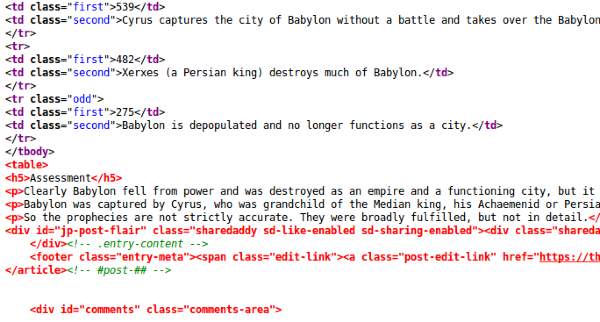
You may also want to remove the
<tbody>as you don’t have a<thead>or more than one table section. This may be causing some of your troubles.I was unable to replicate your result in my test blog using the same theme and content. Unless I removed the ending
</table>and replaced it with<table>You can check the WC3 site validator yourself here:
http://validator.w3.org/check?uri=https%3A%2F%2Ftheway21stcentury.wordpress.com%2Fbible%2Fthe-fulfilment-of-old-testament-prophecy%2F&charset=%28detect+automatically%29&doctype=Inline&group=0 -
You are right, I had omitted the “/” in the closing table tag. That was all it took to fix it. What a silly error for me not to pick up on!
I’m sorry to take your time on such a little error on my part, but thank you for helping me out.
And you taught me a lesson too. Always try validation! Thanks again.
-


- The topic ‘Table in text messes up sidebar’ is closed to new replies.
 WordPress.com Forums