

Textbook theme homepage featured page
-
Hi all, I got a problem with the homepage of my website (www.educationaround.org).
As you can see if you look at the homepage, the featured page (called “La Mission”) on the right is all the way up, attached to the menu, while some space it is supposed to be between the two. The weird thing is, I changed featured page a couple of times and sometimes it’s in the wrong position, sometimes it’s right… Any idea on what could cause the problem?
The blog I need help with is: (visible only to logged in users)
-
Most probably it is because of the cache or maybe different browser, I have opened your website with chrome and there i a space between the two sections.
-
redazioneea – the next time you see the featured page in the wrong position, could you take a screenshot and post it here, along with browser details?
Here’s a guide on how to make a screenshot:
http://en.support.wordpress.com/make-a-screenshot/You can upload the screenshot – in a graphic format like JPG, PNG, or GIF – in your Media Library, and provide a link so I can see it, or upload it with a service like Imgur or Snaggy.
For browser, please provide:
– browser name and version
– browser window dimensions (“web browser size”)Visit https://supportdetails.com/ to quickly grab that info.
-
Thanks to both of you for your answers.
My browser dimensions are 1366×637 (Chrome, 63.0.3239.132)
ScreenshotI checked with Firefox and there was actually just a bit of space between the two, but still nothing compared to what it is supposed to be, as I could see until some days ago using Chrome.
Any ideas?
-
Thanks for the screenshot and browser info. I’ve been able to replicate the issue and will report it to our developers so they can have a look. We’ll keep you posted here.
-
As a follow-up, the issue only seems to occur when the featured-page description is blank. Until it’s fixed, you could try adding some text in the Customizer > Theme Options area under “Featured Content Description” for now:
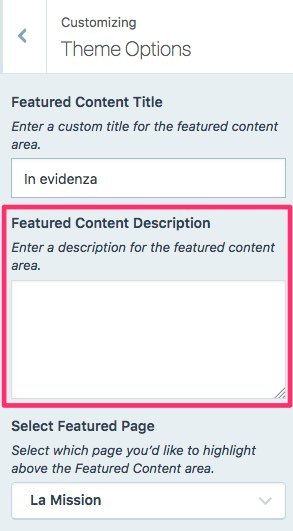
That should prevent the overlap on small screens.
-
Howdy!
Thanks for bringing this issue to our attention. Unfortunately it’s not something that can be fixed in the theme at this time; however, Kathryn’s suggestion to add a description seems to fix the problem on your site, so that’s what I would suggest as well.
I hope this helps!
Cheers,
Caroline


- The topic ‘Textbook theme homepage featured page’ is closed to new replies.
 WordPress.com Forums