

The new editor is hard to use!
-
Why did you change the editor? It was working GREAT before! Now i can’t find anything. Specifically, i’m trying to add a contact form to a new post, or delete a field from the contact form on an existing post. On the new editor, there is no sign of a contact form editor.
The blog I need help with is: (visible only to logged in users)
-
You’re correct. There is no form editor in the new editor. However, if you access the classic editor you’ll be able to make those changes. Click on ‘Edit’ under any of your posts here to access that post in the classic editor:
https://cbjazz.wordpress.com/wp-admin/edit.php
Let me know if you have more questions.
-
There was supposed to be a way to reset your preferences to the classic editor for 6 weeks (?), but i don’t see that option. How do you do it?
-
The option to redirect to the classic editor is located at the bottom of your sidebar:
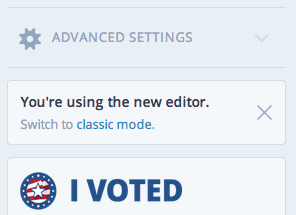
Let me know if I can help with anything else!
-
-
Can you check that you have third party cookies installed:
This is a cookie-based opt-out. So if third party cookies are disabled, this opt-out won’t work. Let me know if your cookies are enabled and the link still isn’t working.
-
OK, here is the msg:
Great, third party cookies are properly enabled in your browser!
but the button still does not implement (at least there is no indication that anything is changing.)
But, hey, it’s not that big a deal!
Most features work wonderfully.
It’s just strange to me that a new version of the software, which supposedly improves things, deletes a feature which some of us use on many of our posts. Perhaps your editors felt that the form feature was vulnerable to hackers? -
I’m not sure why that link isn’t working then. It should take you straight to the classic editor and add the cookie to make your ‘Edit’ links default to the classic editor instead.
If you’d like to get this working, the next suggestion I have is to clear your cache and cookies. It could be that something’s ‘stuck’ with the cookies due to an expired cookie etc. Here’s some steps to do that:
The form editor isn’t vulnerable, but it’s not highly utilized, so it was not included in the new editor.
Let me know if you have any other questions!


- The topic ‘The new editor is hard to use!’ is closed to new replies.


 WordPress.com Forums