

The proper image is not showing when sharing the blog on Facebook.
-
Here’s what the facebook debugger tool shows:
Extraneous Property – Objects of this type do not allow properties named ‘article:publisher’.Parser Mismatched Metadata – The parser’s result for this metadata did not match the input metadata. Likely, this was caused by the data being
ordered in an unexpected way, multiple values being given for a property only expecting a single value, or property values for a given property being mismatched. Here are the input properties that were not seen in the parsed result: ‘article:publisher’The blog I need help with is: (visible only to logged in users)
-
Hi there. I’m afraid this is entirely in Facebook’s control. WordPress.com merely “suggests” which image should be used, but the Facebook software controls the process.
Something you could try (which has worked for me in the past) is to set the image you want used as your featured image, then run the Facebook debugger again. You can see here for more information: https://en.support.wordpress.com/facebook-image-thumbnail/
-
Thank you for your reply. I ran the Facebook Object Debugger again and again before I posted my question, but running it doesn’t fix the image problem. On the Open Graph Object Debugger page, the correct image is listed in the content for Meta Tag for <meta property=”og:image” content…> but the next section showing the “constructed Open Graph properties” shows a different image. That’s why I’m wondering if I need to fix the 2 “Warnings That Should Be Fixed” that I mention in my question. But I haven’t a clue how (where?) to fix those errors.
In the source code, I see <!– Jetpack Open Graph Tags –>, but I don’t know where JetPack is accessed through the dashboard. I’m using the Twenty Eleven Theme — not paying a premium for the site, so I don’t know if I even have access to Jetpack with the basic level on this theme… does the Twenty Eleven Theme automatically handle the JetPack code? Do I need to download the JetPack plugin myself to get access to JetPack and to fix the problem?
Note: I’ve done lots of searches but haven’t found anything to help. I’ve seen some similar questions, but the page doesn’t show any replies and furthermore there’s a statement that the post is closed to further replies (or something like that).
I’m sure it’s obvious I’m a newbie to all this WordPress stuff – thank you for any assistance!
-
There are certain things you can do to help push the right image to Facebook. Setting the image as your featured image is the main one, but the image choosing is controlled by Facebook.
You can look at this article for more details: https://en.support.wordpress.com/facebook-image-thumbnail/
-
Can you please supply a link to the post you’re testing with?
We have a seen a lot more of these issue with Facebook not correctly grabbing the featured image (or other images in the expected order) but we’re still gathering data on what precisely we can do on our end to fix it in cases where re-scraping with Facebook’s object debugger doesn’t solve it.
On WordPress.com we don’t provide access to any back-end files, including Jetpack. So don’t worry, you’re not missing any particular settings, it’s an issue affecting a lot of folks right now. I don’t believe your theme would have any affect, so I’d recommend staying with Twenty Eleven if you like it for your site.
-Alex G.
-
Thank you Alex!
The site is: abidingtruthdwellingamongus.wordpress.com
I’m glad to know I’m not missing anything. I’ve spent countless hours trying to figure this out. I’m pleased with the Twenty Eleven theme and plan to stay with it.
Thank you again!
-
Hi Alex, I just reread your reply. I don’t think it was a specific post that I was testing. I believe I simply used the Facebook share button from the Home page of the blog. Thanks!
-
Hi Francis,
I see the discrepancy you see in the Facebook debugger:
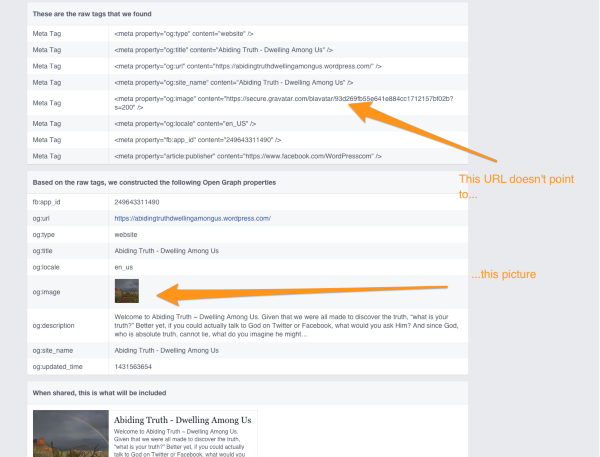
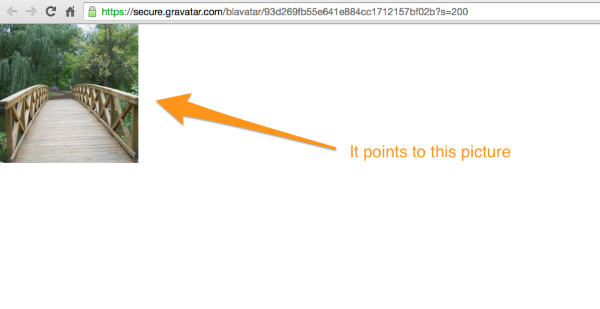
I tried using the Facebook debugger on the source URLs for the image, but it doesn’t seem to interact with Gravatar correctly when that size specification is used (the ‘200’ at the end of the web address.) So I’m not able to get Facebook to scrape the new information.
I tried adding your custom header image as the featured image to that page, but couldn’t get the og:image meta data to update on the page for Facebook to re-scrape it. (My thinking was, if we can get Facebook to scrape it once with a different image entirely, we can then remove the featured image and have it scrape once more, and it should grab the correct Blavatar image that time.)
So we’re sort of stuck in a situation where your site is giving Facebook the correct information, but it’s being stubborn and displaying the old information. I’m a little stumped as to how to proceed after those two ideas, so I’ve asked a developer to help me out with more options.
Sorry for the continued wait, but wanted to let you know we’re working on it. :)
-Alex G.
-
Hello Alex,
Thank you for working on this. No problem on the wait time; I’m glad to have all your help.
While your developer is working on the problem, I want to update you on a similar thing that does handle this image properly: I was composing an email in Yahoo and when I pasted a link to the blog and then hit return, Yahoo inserted into the email something that looks just like the Facebook “share dialog” but Yahoo displays the correct Blavatar image. Is it time to get the Facebook developers involved? :)
-
Hi Francis,
That situation in your email would be expected. The thing is we’re definitely hosting the correct image at the web address Facebook displays, it just continues to show the old image regardless.
Facebook cached it’s previous information from your blavatar URL, that’s why it displays the incorrect image for that web address. Since Yahoo hadn’t cached anything yet, it’s pulling the correct image when you enter it into the email.
Is it time to get the Facebook developers involved? :)
Really wish I had a way to do that, to be honest. Our developers do work with them on a partnership level, but we don’t really have a way to ask them to troubleshoot specific things.
You may have better luck reaching help through their reporting tools:
https://www.facebook.com/help/181495968648557
In the meantime we’ll keep working on anything we can do on our end. :)
-Alex G.
-
Yes, I realize it’s a caching problem with Facebook. Does Yahoo have that same problem or do they actually have the right algorithm/code to construct the share dialog? :)
Thank you for the suggestion to let Facebook know about the problem. I reported it in detail.
In your meantime, I wouldn’t worry too much about a workaround… Unless Facebook never gets around to fixing the problem!
-
Hi Francis,
Thank you for filing it with Facebook. :)
The developer that worked on this with me suggests that the best way to get around this is to re-upload your blavatar image once more. If you re-upload the same image, it will generate a new blavatar URL.
Then re-scrape with the facebook debugger after the new URL is on the site.
Would you mind trying that out?
-Alex G.
-
Hi Alex, I re-loaded the image and re-scraped it with the Facebook debugger. The URL for the blavatar was the same. So then I removed the image, re-loaded it, re-scraped it, and the URL is STILL the same.
Please let me know if you would like me to try anything else with the blavatar.
-
Hi Francis,
Working with a developer to see if we can recreate the Blavatar URL some other way, since reuploading didn’t work as expected.
-Alex G.
-
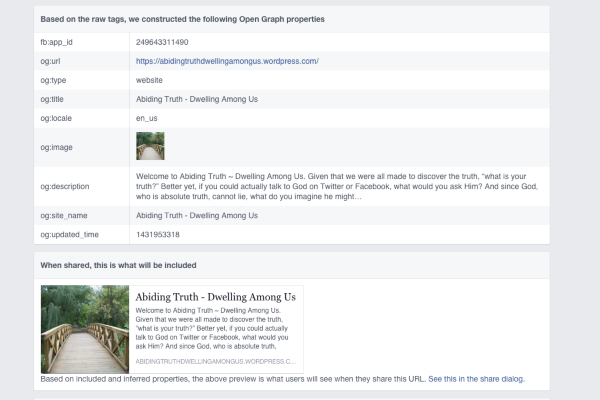
Our developers made some changes to how the Blavatar URLs are created that forces Facebook to re-fetch new Blavatar image when using their debugger.
Your site is using the correct image now in their tool:
-
Fantastic…I am so pleased to see this working, as will be many others! Thank you so much, WordPress Team!
–JP


- The topic ‘The proper image is not showing when sharing the blog on Facebook.’ is closed to new replies.
 WordPress.com Forums