

The Reader overrides my settings to display posts I barely recognize
-
The new Reader has been frustrating me with a number of issues:
1. It doesn’t display my written excerpt; it randomly displays part the first paragraph of my post, or none at all
2. When I insert a gallery of images in a post, the Reader features the gallery, instead of the featured image I have chosen in my post
3. When I insert a few galleries of images, as I did in this lengthy post “Signs of Changing Times,” on 10/6/14, the Reader chose to display only the first gallery, with no excerpt whatsoever, and no indicator of additional words or photos; nothing to show there was any more to my post than two pictures. But there was lots more–take a look, and see why I am frustrated that none of my work appeared to those using the Reader.
4. The Reader seems to be able to only handle the most basic of posts, and cannot follow user settings re featured images, excerpts, YouTubes, Photo Galleries, and the many other options we blog with. We bloggers should have control over what’s shown in the Reader.
5. In addition to the Reader’s malfunctions, it’s woefully inadequate in user functionality such as saving, bookmarking, sharing, sorting. Improvements are needed to compare with most readers, like Feedly, for example.
The blog I need help with is: (visible only to logged in users)
-
Here is the link to the premium them support forum for Bromley
http://premium-themes.forums.wordpress.com/forum/bromleyHere is the link for the associated support doc http://theme.wordpress.com/themes/bromley/support/
-
We bloggers should have control over what’s shown in the Reader.
We don’t such control. Currently, when a post with the Standard, Aside, Link, Quote, or Status post format contains a video or audio embed or slideshow, that embed is pulled out and used in the Reader. Otherwise, it uses an image from the post.
If the post has the Gallery or Image post format, a video or audio embed in that post would not be used in the Reader – one or more images would be used instead.
The way our RSS feeds work is that it pulls and displays the first image it finds inside the post content. When the Reader looks for an image, it goes for the featured image first and then an image inserted into the post — if there are no images that meet the size criteria mentioned above, it will display the image as a thumbnail instead of a large image.
Bottom line: WordPress.COM is a turnkey operation. All blogs hosted here on this multiuser blogging platform are using the same underlying template and we bloggers cannot access and edit it. CSS editing is limited to appearance changes only. It cannot be used to change the way any theme is designed to function http://en.support.wordpress.com/custom-design/#frequently-asked-questions
You are obviously seeking the control that’s available on WordPress.ORG installs, but not on WordPress.COM hosted blogs. Read the comparison here please http://en.support.wordpress.com/com-vs-org/
-
If you decide to hire a web host and move to a WordPress.ORG install read this section of the support docs commencing at “Note: Premium Themes that are licensed for WordPress.com use only and cannot be transferred to self-hosted WordPress.org sites. … http://en.support.wordpress.com/themes/premium-themes/
If you have recent upgrade purchases see here > http://en.support.wordpress.com/my-upgrades/refunds/
-
To the best of my knowledge, the “Reader” is a unique to WordPress.com utility. Moving to a self-hosted WP install will not change how it functions and, in fact, will remove your posts from the Reader (unless a WPcom user subscribes to your RSS feed from your self-hosted site).
As tt has pointed out, we do not have control over how our posts appear in the Reader, but your suggestions are worth posting in the Ideas forum, so I’ve tagged this thread to ask to have this moved there.
-
My understanding from the Bromley theme developer, who’s great about responding and helping, is that what I’m frustrated by is not controllable via the theme; rather, these are overall WordPress.com functions that are not changeable within my theme. I’m glad to know the (complex) hierarchy upon which the Reader relies to choose “featured” images and preview text; but it’s not very clear to the user (me) within the WordPress composer. Appreciate the feedback from you both. Shall I begin a new thread there, or will your tag to move it do the trick?
-
Hi @austindetails,
Please see below:
It doesn’t display my written excerpt; it randomly displays part the first paragraph of my post, or none at all
Correct – When you Reading settings are set to Summary, the Reader will show the first 55 words of your post. You can read more about that here:
http://en.support.wordpress.com/settings/reading-settings/#general-settings
When I insert a gallery of images in a post, the Reader features the gallery, instead of the featured image I have chosen in my post
I’m looking at an example of this here:
http://austindetails.me/2014/10/10/lost-landmarks/
Compared with this:

Timethief and Justjennifer explained this a bit in their previous replies. This is the result of the Reader trying to pick out the best way to display your content. Since that post has little text but quite a few images, it features the post in “Gallery” format and chooses to showcase the images in the gallery. We’re constantly working to tweak this so it displays posts the best way possible. As of right now, it’s not possible to guarantee that your posts will display a certain way.
When I insert a few galleries of images, as I did in this lengthy post “Signs of Changing Times,” on 10/6/14, the Reader chose to display only the first gallery, with no excerpt whatsoever, and no indicator of additional words or photos; nothing to show there was any more to my post than two pictures. But there was lots more–take a look, and see why I am frustrated that none of my work appeared to those using the Reader.
This is similar to the above situation. The Reader does have a “View Galleries” link as shown here that directs readers to the full post:
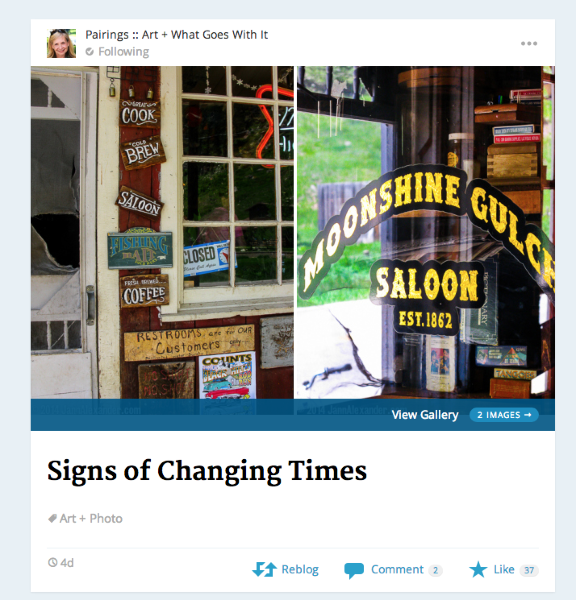
In that particular post, there’s really not an “excerpt” to display. Instead, the Reader displayed the top gallery and then linked to the full post.
The Reader seems to be able to only handle the most basic of posts, and cannot follow user settings re featured images, excerpts, YouTubes, Photo Galleries, and the many other options we blog with. We bloggers should have control over what’s shown in the Reader.
The Reader does allow for things like YouTube videos to be displayed as shown in an example here:
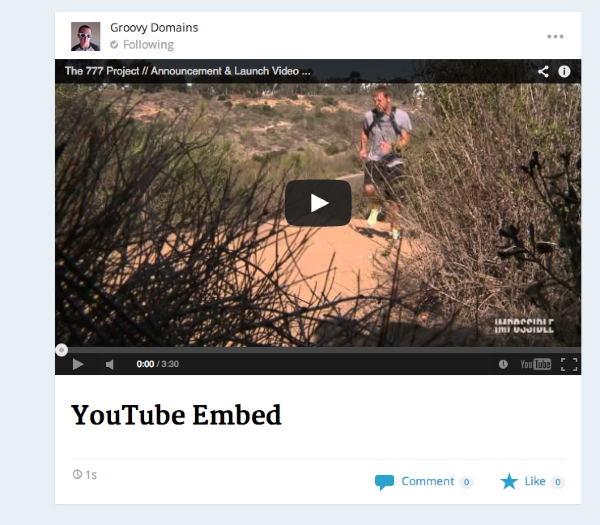
However, It does try to pick the best way to display your posts. So, if you have a post filled with galleries and then a YouTube video in the middle, it likely will not showcase the video as the post appears to be more about the images. Does that make sense?
In addition to the Reader’s malfunctions, it’s woefully inadequate in user functionality such as saving, bookmarking, sharing, sorting. Improvements are needed to compare with most readers, like Feedly, for example.
We definitely appreciate the feedback! We’re working on improving the sorting of blogs and toying with features like lists to help you aggregate topical blogs in a certain location. You’re correct – the Reader definitely doesn’t have the integrations with services like Pocket, Buffer, etc. It’s something we can work on for sure!
I’ve moved this to the Ideas forum so we can discuss putting integrations and some of the other things you’ve mentioned on the roadmap.


- The topic ‘The Reader overrides my settings to display posts I barely recognize’ is closed to new replies.
 WordPress.com Forums