

The videos in my post don't show in the emailed version
-
I have a number of You Tube clips embedded in my post. I currently have my blog set to private while I play around, but I changed it to public for a short bit to see what an email post would look like. The post showed up in my email (I use Gmail), but it just had the text with blank spaces where the videos were supposed to be. What am I missing in how I have this set up? Thanks for your help.
The blog I need help with is: (visible only to logged in users)
-
Hi Steve,
Your video will not be embedded within your new post notification email. However, you should see the YouTube video as an attachment to the email as shown here:
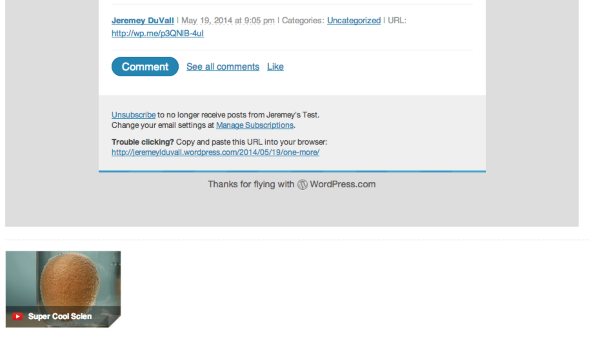
Is that what you’re experiencing on your side?
-
Actually I am not seeing any videos as attachments. The post just ends. I am using the Apple mail reader to access my gmail account.
As a practical matter the attachment format wouldn’t work for what I have in mind. They really need to be linked to the text immediately preceding and following to make sense. Am I better off just using the email notification to send a short summary that then links to the full blog. Or is there a workaround? I would prefer to send full posts with embedded videos if at all possible.
Let me know if you need to see a full post for this to make sense. Thank you for your help with this. Steve
-
Hey Steve,
I completely understand. When I was testing the embeds, I was using the native Gmail interface. I’ve now switched over to Apple Mail, and you are correct – the embeds aren’t shown as attachments. As of right now, I believe you’re better off sending a post summary and then asking readers to click to your site to see the full post. Our notification emails don’t support YouTube embeds as of yet although I see how this would be extremely beneficial.
In order to send summary emails, you will need to navigate to Settings -> Reading and change the setting for “For each article in a feed, show” to “Summary” instead of Full Text.
I’m sorry I couldn’t be of more help right now!
-
Thanks — at least I know where I stand — don’t want to frustrate readers and I know it is hard to get something that works with every flavor of email client. Does the embed in an email work with other types of videos (such as Vimeo or VideoPress?) I don’t think I can go that way right now given the editorial bent of my blog, but thinking down the road.
Also, when I send a summary, do I get to choose where the break occurs? My memory is yes, but wanted to be sure. Steve
-
Hey Steve,
So, it appears as though YouTube and Vimeo embeds will not appear in notification emails regardless of the settings you used. However, VideoPress embeds will be displayed as static images within the email notification. Clicking the image will result in the reader being directed to the blog post (it won’t play in Mac Mail).
Regarding cutting off the break, if you leave your Reading settings set to display the full post in notification emails, you can use the More tag to break the content in emails:
http://en.support.wordpress.com/splitting-content/more-tag/
Where you place the more tag, the content should get split.
Let me know if you have any additional questions!
-
That helps — I will do a little redesign and try again. Appreciate the very prompt reply — I have certainly been impressed with my WordPress.com experience so far. Nice to be able to spend my time creating cool content rather than tinkering under the hood.
-
Not a problem Steve. Happy to help! Let me know if you have any additional questions or run into any more trouble along the way.


- The topic ‘The videos in my post don't show in the emailed version’ is closed to new replies.


 WordPress.com Forums