

Theme and tabs (toc)
-
I want to import my own theme. Here is an example of something I’d like to do: http://vannettachapman.com/ How would I import my own theme?
If I import my own theme, how do I control where my table of contents is (tabs)?
If I import, how do I control how many columns I have?
The blog I need help with is: (visible only to logged in users)
-
Hi there,
I’m sorry, but themes can’t be uploaded to blogs hosted on WordPress.com. They can only be uploaded to self-hosted blogs running on WordPress.org software. You can read more about the differences between WordPress.com and WordPress.org here:
On WordPress.com, you can select from a variety of themes to change your blog’s appearance. You can read more about customizing the appearance and theme of your blog on WordPress.com here:
http://en.support.wordpress.com/themes/adding-new-themes/
We offer over 280 themes, both free themes and premium themes created by leading theme companies. You can view all of our themes and filter them by specific criteria here:
Let me know if you have any questions with this!
-
If I switched from .com to .org, would I lose all my contacts?
I’m not sure what the explanation means when it says I have to set it up on my own web server. It sounds complicated to me. I’m not even sure what a web server is. I’ve used Yahoo’s site builder, but I don’t guess they are a webserver.
Katheryn Maddox Haddad
Read a scripture & inspirational thought every day at
Work a Bible arithmetic problem every day at
https://www.facebook.com/katheryn.haddad.author -
Hi there,
If I switched from .com to .org, would I lose all my contacts?
Contacts? I’m not sure what you mean. Do you mean followers? If you activate the Jetpack plugin you can move over your WordPress.com followers.
I’m not sure what the explanation means when it says I have to set it up on my own web server. It sounds complicated to me. I’m not even sure what a web server is. I’ve used Yahoo’s site builder, but I don’t guess they are a webserver.
You would have to get your own host. Currently you are hosting through us which makes it nice and simple. But you can self-host your site via hosts like GoDaddy, Bluehost, Hostgator, etc.
This guide will step you through the process of moving your site to a WordPress.org instance:
http://en.support.wordpress.com/moving-a-blog/#moving-to-wordpress-org
As we only support sites hosted here at WordPress.com, all issues with the new site – including the importing of the file – must be taken to the WordPress.org support community:
If this seems a bit complicated you can get assistance moving your WordPress.com site to WordPress.org. We have a service called Guided Transfer that does all the work for you. Check it out to see if itâs right for you:
http://en.support.wordpress.com/guided-transfer/
Feel free to reach out if you have any questions!
-
It’s too much over my head right now to switch to .org
1. I need 3-column (one main and two side bars) format. Is there a way for me to search for those criteria without going one by one through all the themes?
2. Is there a blank theme that allows me to set up my own number of columns put images where I want, etc?
-
Hi there!
1. I need 3-column (one main and two side bars) format. Is there a way for me to search for those criteria without going one by one through all the themes?
Sure! I was able to filter out the 3 columns and it looks like we have 66 themes that you can choose from:
http://theme.wordpress.com/themes/features/three-columns/
2. Is there a blank theme that allows me to set up my own number of columns put images where I want, etc?
This wouldn’t be possible but we do have some themes that have up to 4 columns if you decided that you need another one:
http://theme.wordpress.com/themes/features/four-columns/
You can always add an Image Widget to insert images into a sidebar.
-
I’m using a three-column theme right now, but it doesn’t look like I can import a picture to any but the first column. So, when I need a picture in column 2, I have to put it in column 1 over close to column 2.
Am I missing something?
-
Hi there!
What you can do is add an Image Widget to Sidebar 2 on your Widgets page:
https://inspirationsbykatheryn.wordpress.com/wp-admin/widgets.php
It should look something like this:
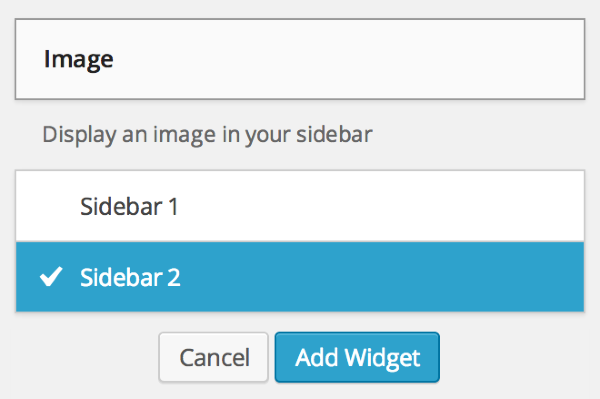
Let me know if you have any questions with this!
-
Thank you. I spent the next 5-6 hours after writing you experimenting with my website. I found out I can eliminate the theme picture completely, or change the picture, but keep the 3-column formatting of my original theme. I can even import my own picture into header if I want (which I did). Only problem is that I lost all my widgets and had to start them all over again. That’s where I found I could insert a picture in sidebar 2.
Well, my website isn’t fancy like those with wordpress.org, but I think it’s a little better.
By the way, awhile back, I inserted my logo into the part of my header that is the toc. I don’t remember how I did it. Do you know how it is done?
-
Hi there,
It looks like you were able to add a site logo? If you go to Appearance > Customize > Site Title you can change the logo if you wish.
Cheers!


- The topic ‘Theme and tabs (toc)’ is closed to new replies.
 WordPress.com Forums